Automation Anywhere - Terminal Emulator Command

Automation Anywhere - Terminal Emulator Command

terminal emulator command in automation anywhere, terminal emulator command in aa, terminal emulator command, automation anywhere, automation anywhere 10.2, automation anywhere analytics, automation anywhere architecture, automation anywhere artificial intelligence, automation anywhere banking, automation anywhere blue prism, automation anywhere bots, automation anywhere case study, automation anywhere ceo, automation anywhere certification, automation anywhere citrix, automation anywhere coding, automation anywhere cognitive, automation anywhere control room, automation anywhere controls, automation anywhere course, automation anywhere create exe, automation anywhere dashboard, automation anywhere data extraction, automation anywhere database, automation anywhere deloitte, automation anywhere demo, automation anywhere demo videos, automation anywhere deployment, automation anywhere development, automation anywhere download, automation anywhere email, automation anywhere enterprise, automation anywhere enterprise manual, automation anywhere error handling, automation anywhere example, automation anywhere excel, automation anywhere exception handling, automation anywhere exe, automation anywhere extract data, automation anywhere extract table, automation anywhere for beginners, automation anywhere founder, automation anywhere framework, automation anywhere getting started, automation anywhere global variables, automation anywhere help, automation anywhere image recognition, automation anywhere installation, automation anywhere integration, automation anywhere interface, automation anywhere interview questions, automation anywhere introduction, automation anywhere ipo, automation anywhere iq bot, automation anywhere keystrokes, automation anywhere learn, automation anywhere list variable, automation anywhere mainframe, Automation anywhere certification,How to register for Automation anywhere certification?
Automation Anywhere

Terminal Emulator Command

This command is use to access and control default, DOS-based actions of remote terminals.

Sub-commands

  • Connect - This command is use to connect to a terminal.
  • Disconnect - This command is use to disconnect from an existing terminal connection.
  • Send Text - This command is use to specify text and send that text to the terminal.
  • Get Text - This command is use to receive text from terminal.
  • Set Field - This command is use to set field either by index or Name for the terminal.
  • Get Field - This command is use to get a field value by Index or Name and assign it to a variable.
  • Get All Fields - This command is use to get value of all fields and assign to an array variable.
  • Wait - This command is used to automate and trigger another action in your automated task based on the terminal status.
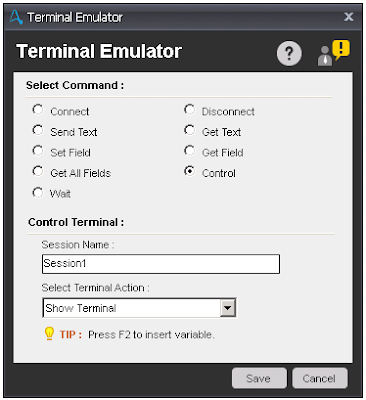
  • Control - This command is use to control how the terminals is viewed. Available options are:
    • Show Terminal
    • Hide Terminal
    • Clear Terminal
    • Set Cursor Position
      terminal emulator command in automation anywhere, terminal emulator command in aa, terminal emulator command, automation anywhere, automation anywhere 10.2, automation anywhere analytics, automation anywhere architecture, automation anywhere artificial intelligence, automation anywhere banking, automation anywhere blue prism, automation anywhere bots, automation anywhere case study, automation anywhere ceo, automation anywhere certification, automation anywhere citrix, automation anywhere coding, automation anywhere cognitive, automation anywhere control room, automation anywhere controls, automation anywhere course, automation anywhere create exe, automation anywhere dashboard, automation anywhere data extraction, automation anywhere database, automation anywhere deloitte, automation anywhere demo, automation anywhere demo videos, automation anywhere deployment, automation anywhere development, automation anywhere download, automation anywhere email, automation anywhere enterprise, automation anywhere enterprise manual, automation anywhere error handling, automation anywhere example, automation anywhere excel, automation anywhere exception handling, automation anywhere exe, automation anywhere extract data, automation anywhere extract table, automation anywhere for beginners, automation anywhere founder, automation anywhere framework, automation anywhere getting started, automation anywhere global variables, automation anywhere help, automation anywhere image recognition, automation anywhere installation, automation anywhere integration, automation anywhere interface, automation anywhere interview questions, automation anywhere introduction, automation anywhere ipo, automation anywhere iq bot, automation anywhere keystrokes, automation anywhere learn, automation anywhere list variable, automation anywhere mainframe, Automation anywhere certification,How to register for Automation anywhere certification?
      Control

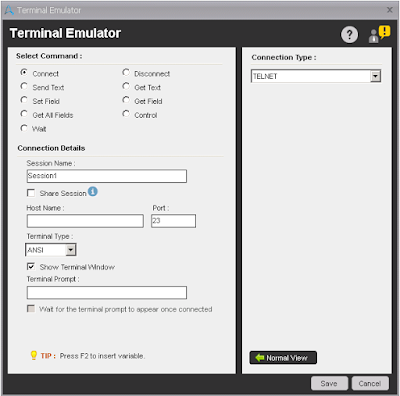
Components of Connect sub-command:

  • Session Name - Specify the name of the session.
  • Share Session - Select this option, if you want to transfer the exact state of the terminal to another Task. This session will be available to tasks called from this task using the Run Task command.
  • Host Name/Port - Specify the Terminal host name and port number.
  • Terminal Type - Select anyone option to define the type of the terminal. ANSI, VT100, TN2370 and TN5250 are available terminal types and ANSI is the default terminal selected.
  • In advanced view, you may select the type of connection and based on connection, define the username and password etc. The default connection type is Telnet. Available types are Telnet, SSH1 and SSH2.
    terminal emulator command in automation anywhere, terminal emulator command in aa, terminal emulator command, automation anywhere, automation anywhere 10.2, automation anywhere analytics, automation anywhere architecture, automation anywhere artificial intelligence, automation anywhere banking, automation anywhere blue prism, automation anywhere bots, automation anywhere case study, automation anywhere ceo, automation anywhere certification, automation anywhere citrix, automation anywhere coding, automation anywhere cognitive, automation anywhere control room, automation anywhere controls, automation anywhere course, automation anywhere create exe, automation anywhere dashboard, automation anywhere data extraction, automation anywhere database, automation anywhere deloitte, automation anywhere demo, automation anywhere demo videos, automation anywhere deployment, automation anywhere development, automation anywhere download, automation anywhere email, automation anywhere enterprise, automation anywhere enterprise manual, automation anywhere error handling, automation anywhere example, automation anywhere excel, automation anywhere exception handling, automation anywhere exe, automation anywhere extract data, automation anywhere extract table, automation anywhere for beginners, automation anywhere founder, automation anywhere framework, automation anywhere getting started, automation anywhere global variables, automation anywhere help, automation anywhere image recognition, automation anywhere installation, automation anywhere integration, automation anywhere interface, automation anywhere interview questions, automation anywhere introduction, automation anywhere ipo, automation anywhere iq bot, automation anywhere keystrokes, automation anywhere learn, automation anywhere list variable, automation anywhere mainframe, Automation anywhere certification,How to register for Automation anywhere certification?
    Connect

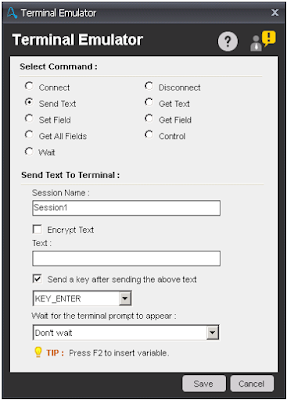
Components of Send Text sub-command:

  • Session Name - Specify the name of the session.
  • Encrypt Text - Select this option, if you want to send text in encrypted format.
  • Text - Enter the text you want to send.
  • Send a key - Select this option, if you want send any key after text is send. If you select this option then need to select the key from the drop-down.
  • Wait - Select any option from the drop-down, you want to perform.
    terminal emulator command in automation anywhere, terminal emulator command in aa, terminal emulator command, automation anywhere, automation anywhere 10.2, automation anywhere analytics, automation anywhere architecture, automation anywhere artificial intelligence, automation anywhere banking, automation anywhere blue prism, automation anywhere bots, automation anywhere case study, automation anywhere ceo, automation anywhere certification, automation anywhere citrix, automation anywhere coding, automation anywhere cognitive, automation anywhere control room, automation anywhere controls, automation anywhere course, automation anywhere create exe, automation anywhere dashboard, automation anywhere data extraction, automation anywhere database, automation anywhere deloitte, automation anywhere demo, automation anywhere demo videos, automation anywhere deployment, automation anywhere development, automation anywhere download, automation anywhere email, automation anywhere enterprise, automation anywhere enterprise manual, automation anywhere error handling, automation anywhere example, automation anywhere excel, automation anywhere exception handling, automation anywhere exe, automation anywhere extract data, automation anywhere extract table, automation anywhere for beginners, automation anywhere founder, automation anywhere framework, automation anywhere getting started, automation anywhere global variables, automation anywhere help, automation anywhere image recognition, automation anywhere installation, automation anywhere integration, automation anywhere interface, automation anywhere interview questions, automation anywhere introduction, automation anywhere ipo, automation anywhere iq bot, automation anywhere keystrokes, automation anywhere learn, automation anywhere list variable, automation anywhere mainframe, Automation anywhere certification,How to register for Automation anywhere certification?
    Send Text

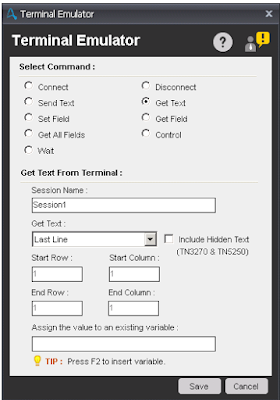
Components of Get Text sub-command:

  • Session Name - Specify the name of the session.
  • Get Text - Select an option from drop-down from where you extract the text. Available options are Last Line, All Lines, Lines From-To and Lines With Column Range. If you select Lines From-To, then you need to specify range in Start Row and End Row fields. If you select Lines With Column Range, then you need to specify range in Start Row-Column and End Row-Column fields.
  • Assign - Specify the variable name where you want to store the data.
    terminal emulator command in automation anywhere, terminal emulator command in aa, terminal emulator command, automation anywhere, automation anywhere 10.2, automation anywhere analytics, automation anywhere architecture, automation anywhere artificial intelligence, automation anywhere banking, automation anywhere blue prism, automation anywhere bots, automation anywhere case study, automation anywhere ceo, automation anywhere certification, automation anywhere citrix, automation anywhere coding, automation anywhere cognitive, automation anywhere control room, automation anywhere controls, automation anywhere course, automation anywhere create exe, automation anywhere dashboard, automation anywhere data extraction, automation anywhere database, automation anywhere deloitte, automation anywhere demo, automation anywhere demo videos, automation anywhere deployment, automation anywhere development, automation anywhere download, automation anywhere email, automation anywhere enterprise, automation anywhere enterprise manual, automation anywhere error handling, automation anywhere example, automation anywhere excel, automation anywhere exception handling, automation anywhere exe, automation anywhere extract data, automation anywhere extract table, automation anywhere for beginners, automation anywhere founder, automation anywhere framework, automation anywhere getting started, automation anywhere global variables, automation anywhere help, automation anywhere image recognition, automation anywhere installation, automation anywhere integration, automation anywhere interface, automation anywhere interview questions, automation anywhere introduction, automation anywhere ipo, automation anywhere iq bot, automation anywhere keystrokes, automation anywhere learn, automation anywhere list variable, automation anywhere mainframe, Automation anywhere certification,How to register for Automation anywhere certification?
    Get Text

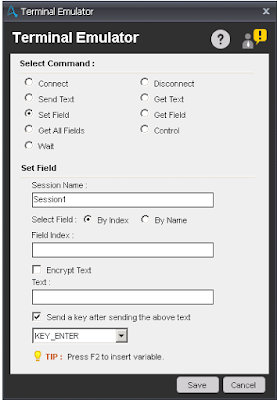
Components of Set Field sub-command:

  • Session Name - Specify the name of the session.
  • Select Field - Select By Index or By Name of the field where you want to set text.
  • Field Index/Field Name - Enter the Field Index or Name, where you want to set text.
  • Encrypt Text - Select this option, if you want to set text in encrypted format.
  • Text - Enter the text you want to send.
  • Send a key - Select this option, if you want send any key after text is set. If you select this option then need to select the key from the drop-down.
    terminal emulator command in automation anywhere, terminal emulator command in aa, terminal emulator command, automation anywhere, automation anywhere 10.2, automation anywhere analytics, automation anywhere architecture, automation anywhere artificial intelligence, automation anywhere banking, automation anywhere blue prism, automation anywhere bots, automation anywhere case study, automation anywhere ceo, automation anywhere certification, automation anywhere citrix, automation anywhere coding, automation anywhere cognitive, automation anywhere control room, automation anywhere controls, automation anywhere course, automation anywhere create exe, automation anywhere dashboard, automation anywhere data extraction, automation anywhere database, automation anywhere deloitte, automation anywhere demo, automation anywhere demo videos, automation anywhere deployment, automation anywhere development, automation anywhere download, automation anywhere email, automation anywhere enterprise, automation anywhere enterprise manual, automation anywhere error handling, automation anywhere example, automation anywhere excel, automation anywhere exception handling, automation anywhere exe, automation anywhere extract data, automation anywhere extract table, automation anywhere for beginners, automation anywhere founder, automation anywhere framework, automation anywhere getting started, automation anywhere global variables, automation anywhere help, automation anywhere image recognition, automation anywhere installation, automation anywhere integration, automation anywhere interface, automation anywhere interview questions, automation anywhere introduction, automation anywhere ipo, automation anywhere iq bot, automation anywhere keystrokes, automation anywhere learn, automation anywhere list variable, automation anywhere mainframe, Automation anywhere certification,How to register for Automation anywhere certification?
    Set Field

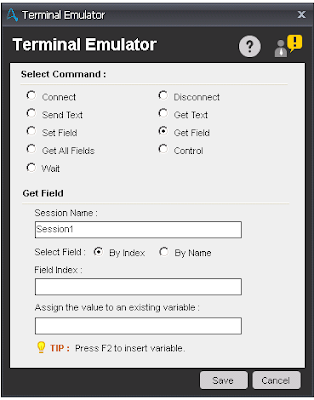
Components of Get Field sub-command:

  • Session Name - Specify the name of the session.
  • Select Field - Select By Index or By Name of the field from where you want to get text.
  • Field Index/Field Name - Enter the Field Index or Name, where you want to get text.
  • Assign - Enter the variable to store text.
    terminal emulator command in automation anywhere, terminal emulator command in aa, terminal emulator command, automation anywhere, automation anywhere 10.2, automation anywhere analytics, automation anywhere architecture, automation anywhere artificial intelligence, automation anywhere banking, automation anywhere blue prism, automation anywhere bots, automation anywhere case study, automation anywhere ceo, automation anywhere certification, automation anywhere citrix, automation anywhere coding, automation anywhere cognitive, automation anywhere control room, automation anywhere controls, automation anywhere course, automation anywhere create exe, automation anywhere dashboard, automation anywhere data extraction, automation anywhere database, automation anywhere deloitte, automation anywhere demo, automation anywhere demo videos, automation anywhere deployment, automation anywhere development, automation anywhere download, automation anywhere email, automation anywhere enterprise, automation anywhere enterprise manual, automation anywhere error handling, automation anywhere example, automation anywhere excel, automation anywhere exception handling, automation anywhere exe, automation anywhere extract data, automation anywhere extract table, automation anywhere for beginners, automation anywhere founder, automation anywhere framework, automation anywhere getting started, automation anywhere global variables, automation anywhere help, automation anywhere image recognition, automation anywhere installation, automation anywhere integration, automation anywhere interface, automation anywhere interview questions, automation anywhere introduction, automation anywhere ipo, automation anywhere iq bot, automation anywhere keystrokes, automation anywhere learn, automation anywhere list variable, automation anywhere mainframe, Automation anywhere certification,How to register for Automation anywhere certification?
    Get Field

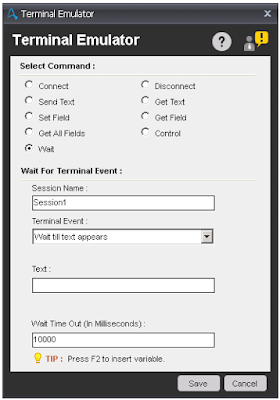
Components of Wait sub-command:

  • Session Name - Specify the name of the session.
  • Terminal Event - Select any event from drop-down. Based on event selected, you need to specify the text or cursor position. Available Events are:
    • Wait till text appears
    • Wait till text disappears
    • Wait till cursor moves to position
    • Wait till cursor moves out of position
    • Wait till screen gets blank
    • Wait till screen contain text
    • Wait till terminal prompt appears
    • Wait till terminal Ready State
      terminal emulator command in automation anywhere, terminal emulator command in aa, terminal emulator command, automation anywhere, automation anywhere 10.2, automation anywhere analytics, automation anywhere architecture, automation anywhere artificial intelligence, automation anywhere banking, automation anywhere blue prism, automation anywhere bots, automation anywhere case study, automation anywhere ceo, automation anywhere certification, automation anywhere citrix, automation anywhere coding, automation anywhere cognitive, automation anywhere control room, automation anywhere controls, automation anywhere course, automation anywhere create exe, automation anywhere dashboard, automation anywhere data extraction, automation anywhere database, automation anywhere deloitte, automation anywhere demo, automation anywhere demo videos, automation anywhere deployment, automation anywhere development, automation anywhere download, automation anywhere email, automation anywhere enterprise, automation anywhere enterprise manual, automation anywhere error handling, automation anywhere example, automation anywhere excel, automation anywhere exception handling, automation anywhere exe, automation anywhere extract data, automation anywhere extract table, automation anywhere for beginners, automation anywhere founder, automation anywhere framework, automation anywhere getting started, automation anywhere global variables, automation anywhere help, automation anywhere image recognition, automation anywhere installation, automation anywhere integration, automation anywhere interface, automation anywhere interview questions, automation anywhere introduction, automation anywhere ipo, automation anywhere iq bot, automation anywhere keystrokes, automation anywhere learn, automation anywhere list variable, automation anywhere mainframe, Automation anywhere certification,How to register for Automation anywhere certification?
      Wait

Share:

Automation Anywhere - XML Command

Automation Anywhere - XML Command

XML Command in Aution Anywhere, XML command in automation anywhere, xml command in aa, XML Command, automation anywhere, automation anywhere 10.2, automation anywhere analytics, automation anywhere architecture, automation anywhere artificial intelligence, automation anywhere banking, automation anywhere blue prism, automation anywhere bots, automation anywhere case study, automation anywhere ceo, automation anywhere certification, automation anywhere citrix, automation anywhere coding, automation anywhere cognitive, automation anywhere control room, automation anywhere controls, automation anywhere course, automation anywhere create exe, automation anywhere dashboard, automation anywhere data extraction, automation anywhere database, automation anywhere deloitte, automation anywhere demo, automation anywhere demo videos, automation anywhere deployment, automation anywhere development, automation anywhere download, automation anywhere email, automation anywhere enterprise, automation anywhere enterprise manual, automation anywhere error handling, automation anywhere example, automation anywhere excel, automation anywhere exception handling, automation anywhere exe, automation anywhere extract data, automation anywhere extract table, automation anywhere for beginners, automation anywhere founder, automation anywhere framework, automation anywhere getting started, automation anywhere global variables, automation anywhere help, automation anywhere image recognition, automation anywhere installation, automation anywhere integration, automation anywhere interface, automation anywhere interview questions, automation anywhere introduction, automation anywhere ipo, automation anywhere iq bot, automation anywhere keystrokes, automation anywhere learn, automation anywhere list variable, automation anywhere mainframe, Automation anywhere certification,How to register for Automation anywhere certification?
Automation Anywhere

XML Command

This command is use to capture data that has XML formatting.

Sub-commands

  • Start XML Session - This command is use to specify session name and XML file path to start work on it.
  • End XML Session - This command is use to close an XML session.
  • Insert Node - This command is use to insert a node with attributes and name spaces you specify.
  • Delete Node/Attribute - This command is use to delete a node or attribute from the XML file.
  • Update Node(s) - This command is use to update nodes in a session at the position that is specified for the XPath expression.
  • Validate XML Document - This command is use to validate session data using XML schema files (.xsd) or internal Document Type Definitions (DTDs).
  • Get Node(s) - This command is use to retrieve the values of nodes or attributes in the session data.
  • Save Session Data - This command is use to save the session data to a variable.
  • Execute XPath Function - This command is use to execute an XPath function and store the results in a variable.

Components of Start XML Session:

  • Session Name - Specify the name of the session.
  • Data Source -
    • File - Select an XML file name.
    • Text - Paste XML formatted data.
      XML Command in Aution Anywhere, XML command in automation anywhere, xml command in aa, XML Command, automation anywhere, automation anywhere 10.2, automation anywhere analytics, automation anywhere architecture, automation anywhere artificial intelligence, automation anywhere banking, automation anywhere blue prism, automation anywhere bots, automation anywhere case study, automation anywhere ceo, automation anywhere certification, automation anywhere citrix, automation anywhere coding, automation anywhere cognitive, automation anywhere control room, automation anywhere controls, automation anywhere course, automation anywhere create exe, automation anywhere dashboard, automation anywhere data extraction, automation anywhere database, automation anywhere deloitte, automation anywhere demo, automation anywhere demo videos, automation anywhere deployment, automation anywhere development, automation anywhere download, automation anywhere email, automation anywhere enterprise, automation anywhere enterprise manual, automation anywhere error handling, automation anywhere example, automation anywhere excel, automation anywhere exception handling, automation anywhere exe, automation anywhere extract data, automation anywhere extract table, automation anywhere for beginners, automation anywhere founder, automation anywhere framework, automation anywhere getting started, automation anywhere global variables, automation anywhere help, automation anywhere image recognition, automation anywhere installation, automation anywhere integration, automation anywhere interface, automation anywhere interview questions, automation anywhere introduction, automation anywhere ipo, automation anywhere iq bot, automation anywhere keystrokes, automation anywhere learn, automation anywhere list variable, automation anywhere mainframe, Automation anywhere certification,How to register for Automation anywhere certification?
      Start XML Session

      XML Command in Aution Anywhere, XML command in automation anywhere, xml command in aa, XML Command, automation anywhere, automation anywhere 10.2, automation anywhere analytics, automation anywhere architecture, automation anywhere artificial intelligence, automation anywhere banking, automation anywhere blue prism, automation anywhere bots, automation anywhere case study, automation anywhere ceo, automation anywhere certification, automation anywhere citrix, automation anywhere coding, automation anywhere cognitive, automation anywhere control room, automation anywhere controls, automation anywhere course, automation anywhere create exe, automation anywhere dashboard, automation anywhere data extraction, automation anywhere database, automation anywhere deloitte, automation anywhere demo, automation anywhere demo videos, automation anywhere deployment, automation anywhere development, automation anywhere download, automation anywhere email, automation anywhere enterprise, automation anywhere enterprise manual, automation anywhere error handling, automation anywhere example, automation anywhere excel, automation anywhere exception handling, automation anywhere exe, automation anywhere extract data, automation anywhere extract table, automation anywhere for beginners, automation anywhere founder, automation anywhere framework, automation anywhere getting started, automation anywhere global variables, automation anywhere help, automation anywhere image recognition, automation anywhere installation, automation anywhere integration, automation anywhere interface, automation anywhere interview questions, automation anywhere introduction, automation anywhere ipo, automation anywhere iq bot, automation anywhere keystrokes, automation anywhere learn, automation anywhere list variable, automation anywhere mainframe, Automation anywhere certification,How to register for Automation anywhere certification?
      End XML Session

Components of Insert Node:

  • Session Name - Specify the name of the session.
  • XPath Expression - Location of the Node where you want to insert node.
  • Node Name - Name of the Node.
  • Node Value - Value of inserted node.
  • If Node name is present -
    • Insert It Anyways - Insert a duplicate node.
    • Skip It - Skip the newly inserted node.
    • Overwrite It - Overwrite the value of the node.
  • Insert Node Location -
    • Beginning of child nodes.
    • End of child nodes.
    • Before specific child node. If you select this option then need to specify the child node in "Specified child node name" field.
    • After specific child node. If you select this option then need to specify the child node in "Specified child node name" field.
  • Default Namespace - Specify the namespace of inserted node.
    XML Command in Aution Anywhere, XML command in automation anywhere, xml command in aa, XML Command, automation anywhere, automation anywhere 10.2, automation anywhere analytics, automation anywhere architecture, automation anywhere artificial intelligence, automation anywhere banking, automation anywhere blue prism, automation anywhere bots, automation anywhere case study, automation anywhere ceo, automation anywhere certification, automation anywhere citrix, automation anywhere coding, automation anywhere cognitive, automation anywhere control room, automation anywhere controls, automation anywhere course, automation anywhere create exe, automation anywhere dashboard, automation anywhere data extraction, automation anywhere database, automation anywhere deloitte, automation anywhere demo, automation anywhere demo videos, automation anywhere deployment, automation anywhere development, automation anywhere download, automation anywhere email, automation anywhere enterprise, automation anywhere enterprise manual, automation anywhere error handling, automation anywhere example, automation anywhere excel, automation anywhere exception handling, automation anywhere exe, automation anywhere extract data, automation anywhere extract table, automation anywhere for beginners, automation anywhere founder, automation anywhere framework, automation anywhere getting started, automation anywhere global variables, automation anywhere help, automation anywhere image recognition, automation anywhere installation, automation anywhere integration, automation anywhere interface, automation anywhere interview questions, automation anywhere introduction, automation anywhere ipo, automation anywhere iq bot, automation anywhere keystrokes, automation anywhere learn, automation anywhere list variable, automation anywhere mainframe, Automation anywhere certification,How to register for Automation anywhere certification?
    Insert Node

Note - In advanced view, user able to add/update/delete Attributes and Namespace.

Components of Delete Node/Attribute.

  • Session Name - Specify the name of the session.
  • XPath Expression - Location of the node.
  • Attribute - Name of the Attribute.
    XML Command in Aution Anywhere, XML command in automation anywhere, xml command in aa, XML Command, automation anywhere, automation anywhere 10.2, automation anywhere analytics, automation anywhere architecture, automation anywhere artificial intelligence, automation anywhere banking, automation anywhere blue prism, automation anywhere bots, automation anywhere case study, automation anywhere ceo, automation anywhere certification, automation anywhere citrix, automation anywhere coding, automation anywhere cognitive, automation anywhere control room, automation anywhere controls, automation anywhere course, automation anywhere create exe, automation anywhere dashboard, automation anywhere data extraction, automation anywhere database, automation anywhere deloitte, automation anywhere demo, automation anywhere demo videos, automation anywhere deployment, automation anywhere development, automation anywhere download, automation anywhere email, automation anywhere enterprise, automation anywhere enterprise manual, automation anywhere error handling, automation anywhere example, automation anywhere excel, automation anywhere exception handling, automation anywhere exe, automation anywhere extract data, automation anywhere extract table, automation anywhere for beginners, automation anywhere founder, automation anywhere framework, automation anywhere getting started, automation anywhere global variables, automation anywhere help, automation anywhere image recognition, automation anywhere installation, automation anywhere integration, automation anywhere interface, automation anywhere interview questions, automation anywhere introduction, automation anywhere ipo, automation anywhere iq bot, automation anywhere keystrokes, automation anywhere learn, automation anywhere list variable, automation anywhere mainframe, Automation anywhere certification,How to register for Automation anywhere certification?
    Delete Node

Components of Update Node(s):

  • Session Name - Specify the name of the session.
  • XPath Expression - Location of the node.
  • New Value - Value of Node.
  • Update Attribute - This option is use to update the attribute of the specified node.
    XML Command in Aution Anywhere, XML command in automation anywhere, xml command in aa, XML Command, automation anywhere, automation anywhere 10.2, automation anywhere analytics, automation anywhere architecture, automation anywhere artificial intelligence, automation anywhere banking, automation anywhere blue prism, automation anywhere bots, automation anywhere case study, automation anywhere ceo, automation anywhere certification, automation anywhere citrix, automation anywhere coding, automation anywhere cognitive, automation anywhere control room, automation anywhere controls, automation anywhere course, automation anywhere create exe, automation anywhere dashboard, automation anywhere data extraction, automation anywhere database, automation anywhere deloitte, automation anywhere demo, automation anywhere demo videos, automation anywhere deployment, automation anywhere development, automation anywhere download, automation anywhere email, automation anywhere enterprise, automation anywhere enterprise manual, automation anywhere error handling, automation anywhere example, automation anywhere excel, automation anywhere exception handling, automation anywhere exe, automation anywhere extract data, automation anywhere extract table, automation anywhere for beginners, automation anywhere founder, automation anywhere framework, automation anywhere getting started, automation anywhere global variables, automation anywhere help, automation anywhere image recognition, automation anywhere installation, automation anywhere integration, automation anywhere interface, automation anywhere interview questions, automation anywhere introduction, automation anywhere ipo, automation anywhere iq bot, automation anywhere keystrokes, automation anywhere learn, automation anywhere list variable, automation anywhere mainframe, Automation anywhere certification,How to register for Automation anywhere certification?
    Update Node(s)

Components of Validate XML Document:

  • Session Name - Specify the name of the session.
  • Select Validation Type -
    • XML Schema(.xsd) - Add an schema file to validate XML Document.
    • Internal DTD - Select this option to validate XML Document from DTD available in AA.
    • Well Formed - Select this option to check whether XML document is Well Formed or not.
  • Assign Output - Assign the output of the validation step (VALID/INVALID) in a variable. If an error occurs during validation, it is stored in the system variables named: $Error Line Number$ and $Error Description$.
    XML Command in Aution Anywhere, XML command in automation anywhere, xml command in aa, XML Command, automation anywhere, automation anywhere 10.2, automation anywhere analytics, automation anywhere architecture, automation anywhere artificial intelligence, automation anywhere banking, automation anywhere blue prism, automation anywhere bots, automation anywhere case study, automation anywhere ceo, automation anywhere certification, automation anywhere citrix, automation anywhere coding, automation anywhere cognitive, automation anywhere control room, automation anywhere controls, automation anywhere course, automation anywhere create exe, automation anywhere dashboard, automation anywhere data extraction, automation anywhere database, automation anywhere deloitte, automation anywhere demo, automation anywhere demo videos, automation anywhere deployment, automation anywhere development, automation anywhere download, automation anywhere email, automation anywhere enterprise, automation anywhere enterprise manual, automation anywhere error handling, automation anywhere example, automation anywhere excel, automation anywhere exception handling, automation anywhere exe, automation anywhere extract data, automation anywhere extract table, automation anywhere for beginners, automation anywhere founder, automation anywhere framework, automation anywhere getting started, automation anywhere global variables, automation anywhere help, automation anywhere image recognition, automation anywhere installation, automation anywhere integration, automation anywhere interface, automation anywhere interview questions, automation anywhere introduction, automation anywhere ipo, automation anywhere iq bot, automation anywhere keystrokes, automation anywhere learn, automation anywhere list variable, automation anywhere mainframe, Automation anywhere certification,How to register for Automation anywhere certification?
    Validate XML Document

Components of Get Node(s):

  • Get Node(s) -
    • Get Single Node - Retrieves the value of a single node or attribute from the session data, at the position specified in the XPath expression. The value is assigned to a variable.
    • Multiple Nodes - Retrieves values from multiple nodes in the session data, using Text value/XPath expression/Specified attribute name, based on the specified XPath expression.
      XML Command in Aution Anywhere, XML command in automation anywhere, xml command in aa, XML Command, automation anywhere, automation anywhere 10.2, automation anywhere analytics, automation anywhere architecture, automation anywhere artificial intelligence, automation anywhere banking, automation anywhere blue prism, automation anywhere bots, automation anywhere case study, automation anywhere ceo, automation anywhere certification, automation anywhere citrix, automation anywhere coding, automation anywhere cognitive, automation anywhere control room, automation anywhere controls, automation anywhere course, automation anywhere create exe, automation anywhere dashboard, automation anywhere data extraction, automation anywhere database, automation anywhere deloitte, automation anywhere demo, automation anywhere demo videos, automation anywhere deployment, automation anywhere development, automation anywhere download, automation anywhere email, automation anywhere enterprise, automation anywhere enterprise manual, automation anywhere error handling, automation anywhere example, automation anywhere excel, automation anywhere exception handling, automation anywhere exe, automation anywhere extract data, automation anywhere extract table, automation anywhere for beginners, automation anywhere founder, automation anywhere framework, automation anywhere getting started, automation anywhere global variables, automation anywhere help, automation anywhere image recognition, automation anywhere installation, automation anywhere integration, automation anywhere interface, automation anywhere interview questions, automation anywhere introduction, automation anywhere ipo, automation anywhere iq bot, automation anywhere keystrokes, automation anywhere learn, automation anywhere list variable, automation anywhere mainframe, Automation anywhere certification,How to register for Automation anywhere certification?
      Get Node(s)

Components of Save Session Data:

  • Session Name - Specify the name of the session.
  • Assign XML Data - Assign XML data into the variable.
  • Write XML Data - Select this option and specify the filename with path, if you want to save XML data into a file.
    XML Command in Aution Anywhere, XML command in automation anywhere, xml command in aa, XML Command, automation anywhere, automation anywhere 10.2, automation anywhere analytics, automation anywhere architecture, automation anywhere artificial intelligence, automation anywhere banking, automation anywhere blue prism, automation anywhere bots, automation anywhere case study, automation anywhere ceo, automation anywhere certification, automation anywhere citrix, automation anywhere coding, automation anywhere cognitive, automation anywhere control room, automation anywhere controls, automation anywhere course, automation anywhere create exe, automation anywhere dashboard, automation anywhere data extraction, automation anywhere database, automation anywhere deloitte, automation anywhere demo, automation anywhere demo videos, automation anywhere deployment, automation anywhere development, automation anywhere download, automation anywhere email, automation anywhere enterprise, automation anywhere enterprise manual, automation anywhere error handling, automation anywhere example, automation anywhere excel, automation anywhere exception handling, automation anywhere exe, automation anywhere extract data, automation anywhere extract table, automation anywhere for beginners, automation anywhere founder, automation anywhere framework, automation anywhere getting started, automation anywhere global variables, automation anywhere help, automation anywhere image recognition, automation anywhere installation, automation anywhere integration, automation anywhere interface, automation anywhere interview questions, automation anywhere introduction, automation anywhere ipo, automation anywhere iq bot, automation anywhere keystrokes, automation anywhere learn, automation anywhere list variable, automation anywhere mainframe, Automation anywhere certification,How to register for Automation anywhere certification?
    Save Session Data

Components of Execute XPath Function:

  • Session Name - Specify the name of the session.
  • XPath Expression - Location of the Node.
    XML Command in Aution Anywhere, XML command in automation anywhere, xml command in aa, XML Command, automation anywhere, automation anywhere 10.2, automation anywhere analytics, automation anywhere architecture, automation anywhere artificial intelligence, automation anywhere banking, automation anywhere blue prism, automation anywhere bots, automation anywhere case study, automation anywhere ceo, automation anywhere certification, automation anywhere citrix, automation anywhere coding, automation anywhere cognitive, automation anywhere control room, automation anywhere controls, automation anywhere course, automation anywhere create exe, automation anywhere dashboard, automation anywhere data extraction, automation anywhere database, automation anywhere deloitte, automation anywhere demo, automation anywhere demo videos, automation anywhere deployment, automation anywhere development, automation anywhere download, automation anywhere email, automation anywhere enterprise, automation anywhere enterprise manual, automation anywhere error handling, automation anywhere example, automation anywhere excel, automation anywhere exception handling, automation anywhere exe, automation anywhere extract data, automation anywhere extract table, automation anywhere for beginners, automation anywhere founder, automation anywhere framework, automation anywhere getting started, automation anywhere global variables, automation anywhere help, automation anywhere image recognition, automation anywhere installation, automation anywhere integration, automation anywhere interface, automation anywhere interview questions, automation anywhere introduction, automation anywhere ipo, automation anywhere iq bot, automation anywhere keystrokes, automation anywhere learn, automation anywhere list variable, automation anywhere mainframe, Automation anywhere certification,How to register for Automation anywhere certification?
    Execute XPath Function

Share:

Automation Anywhere - Image Recognition

Automation Anywhere - Image Recognition

image recognition in automation anywhere, image recognition in AA, image recognition, IR in automation anywhere, ir in aa,automation anywhere, automation anywhere 10.2, automation anywhere analytics, automation anywhere architecture, automation anywhere artificial intelligence, automation anywhere banking, automation anywhere blue prism, automation anywhere bots, automation anywhere case study, automation anywhere ceo, automation anywhere certification, automation anywhere citrix, automation anywhere coding, automation anywhere cognitive, automation anywhere control room, automation anywhere controls, automation anywhere course, automation anywhere create exe, automation anywhere dashboard, automation anywhere data extraction, automation anywhere database, automation anywhere deloitte, automation anywhere demo, automation anywhere demo videos, automation anywhere deployment, automation anywhere development, automation anywhere download, automation anywhere email, automation anywhere enterprise, automation anywhere enterprise manual, automation anywhere error handling, automation anywhere example, automation anywhere excel, automation anywhere exception handling, automation anywhere exe, automation anywhere extract data, automation anywhere extract table, automation anywhere for beginners, automation anywhere founder, automation anywhere framework, automation anywhere getting started, automation anywhere global variables, automation anywhere help, automation anywhere image recognition, automation anywhere installation, automation anywhere integration, automation anywhere interface, automation anywhere interview questions, automation anywhere introduction, automation anywhere ipo, automation anywhere iq bot, automation anywhere keystrokes, automation anywhere learn, automation anywhere list variable, automation anywhere mainframe, Automation anywhere certification,How to register for Automation anywhere certification?
Automation Anywhere


Image Recognition Command

This command provides a visual approach to work with you applications.
In some cases when application UI elements nay not available for automation you can use Image based automation. Such as Citrix or application accessed from RDP, legacy application.

Components of Image Recognition:

  • Image 1 -
    • Select Window - Select you application's title.
    • Capture - This option is use to capture the Screen/Area, you want to automate.
    • Show Coordinates - Select this option if you want to view the coordinates of the target image.
    • Wait before capturing the image - Enter time in ms(milliseconds) to wait before capturing the image for target image.
  • Image 2 -
    • From Window/From File - Select any option as per your requirement. You may select image from the application using From Window option or you may select image from your local system using From File option.
    • Select Window - Select you application's title.
    • Capture - This option is use to capture the Screen/Area, you want to automate.
    • If image found - If you want to click on image or link or menu, then select any of the three options. Options are Left Click, Right Click and Double-Click.
    • Match Percentage - A 100% Match percentage means none of the pixels should mismatch between the two images. A match percentage of 30 means that even if up to 30% pixels mismatch between the two images, the images will be considered to match.
    • Tolerance - A 0% tolerance means the individual RGB values of the pixels being compared must match. Similarly, a 30% tolerance could allow the individual RGB values of the pixels to vary from +30-% to -30% for a successful match.
    • Comparison Mode -
      • Normal Mode - Compares the RGB components of the pixels with the source.
      • Gray-scaled Mode - Converts pixels to an appropriate level of gray-scale prior to comparing.
      • Monochrome mode with Threshold - Converts pixels to either black or white prior to comparing. The threshold value is used while converting the RGB or Gray-scaled pixels to either black or white.
    • Quick Test - Using this button, quickly ascertain the output is as required.

When Secure Recording is enabled from Control Room:

  • When you capture the image during automation, bot images - image1 and Image1 are shown for preview but Image1 will not be saved and Image 2 will not be shown once you save the command.
  • When you edit, both Image1 and Image2 will not show in preview.
  • When you select From File option from Image2, you will not be able to locate the image once the command is saved.
    image recognition in automation anywhere, image recognition in AA, image recognition, IR in automation anywhere, ir in aa,automation anywhere, automation anywhere 10.2, automation anywhere analytics, automation anywhere architecture, automation anywhere artificial intelligence, automation anywhere banking, automation anywhere blue prism, automation anywhere bots, automation anywhere case study, automation anywhere ceo, automation anywhere certification, automation anywhere citrix, automation anywhere coding, automation anywhere cognitive, automation anywhere control room, automation anywhere controls, automation anywhere course, automation anywhere create exe, automation anywhere dashboard, automation anywhere data extraction, automation anywhere database, automation anywhere deloitte, automation anywhere demo, automation anywhere demo videos, automation anywhere deployment, automation anywhere development, automation anywhere download, automation anywhere email, automation anywhere enterprise, automation anywhere enterprise manual, automation anywhere error handling, automation anywhere example, automation anywhere excel, automation anywhere exception handling, automation anywhere exe, automation anywhere extract data, automation anywhere extract table, automation anywhere for beginners, automation anywhere founder, automation anywhere framework, automation anywhere getting started, automation anywhere global variables, automation anywhere help, automation anywhere image recognition, automation anywhere installation, automation anywhere integration, automation anywhere interface, automation anywhere interview questions, automation anywhere introduction, automation anywhere ipo, automation anywhere iq bot, automation anywhere keystrokes, automation anywhere learn, automation anywhere list variable, automation anywhere mainframe, Automation anywhere certification,How to register for Automation anywhere certification?
    Image Recognition

Share:

Automation Anywhere - Error Handling and OCR

Automation Anywhere - Error Handling and OCR

Error handling in Automation anywhere, error handling in AA, error handling, ocr, ocr in automation anywhere, ocr in aa,automation anywhere, automation anywhere 10.2, automation anywhere analytics, automation anywhere architecture, automation anywhere artificial intelligence, automation anywhere banking, automation anywhere blue prism, automation anywhere bots, automation anywhere case study, automation anywhere ceo, automation anywhere certification, automation anywhere citrix, automation anywhere coding, automation anywhere cognitive, automation anywhere control room, automation anywhere controls, automation anywhere course, automation anywhere create exe, automation anywhere dashboard, automation anywhere data extraction, automation anywhere database, automation anywhere deloitte, automation anywhere demo, automation anywhere demo videos, automation anywhere deployment, automation anywhere development, automation anywhere download, automation anywhere email, automation anywhere enterprise, automation anywhere enterprise manual, automation anywhere error handling, automation anywhere example, automation anywhere excel, automation anywhere exception handling, automation anywhere exe, automation anywhere extract data, automation anywhere extract table, automation anywhere for beginners, automation anywhere founder, automation anywhere framework, automation anywhere getting started, automation anywhere global variables, automation anywhere help, automation anywhere image recognition, automation anywhere installation, automation anywhere integration, automation anywhere interface, automation anywhere interview questions, automation anywhere introduction, automation anywhere ipo, automation anywhere iq bot, automation anywhere keystrokes, automation anywhere learn, automation anywhere list variable, automation anywhere mainframe, Automation anywhere certification,How to register for Automation anywhere certification?
Automation Anywhere

Error Handling Command

This command is use to insert a handle errors while running a TaskBot / MetaBot Logic. You can isolate errors that occur when running your TaskBot / MetaBot Logic.

Components of Begin Error Handling Command

  • Error Handling Action - Select 'Continue' or 'Stop Task' whenever an error occur. By default, Continue option is selected. Once you select 'Continue' and any error occurs, next line of code starts execution. If you select 'Stop Task' option and any error occurs, then next line code not executed and that Taskbot stops the process.
  • Run Task - Run another TaskBot / MetaBot Logic when the current TaskBot / MetaBot Logic encounters an error.
  • Log Data into File - Log the error into a file. You can log the Error Line No. and Description, then use the system variables $Error Line Number$ and $Error Description$.
    • Add Timestamp – A timestamp of an error log into the file.
    • Append into Log file - Error message append into a file instead of overwrite it. By default, this option is selected.
  • Send Mail - Send an email when the error occurs.
    • Attach Snapshot – A snapshot of the screen is attached to the email.
    • Attach Variable - A text file that lists the values of all Variables (System Variables + User Defined Variables) is attached to the email.
  • Variable Assignment - Specify a value to be assigned to a variable and Set Task Status Pass or Fail depending on the Error handling action.
    Error handling in Automation anywhere, error handling in AA, error handling, ocr, ocr in automation anywhere, ocr in aa,automation anywhere, automation anywhere 10.2, automation anywhere analytics, automation anywhere architecture, automation anywhere artificial intelligence, automation anywhere banking, automation anywhere blue prism, automation anywhere bots, automation anywhere case study, automation anywhere ceo, automation anywhere certification, automation anywhere citrix, automation anywhere coding, automation anywhere cognitive, automation anywhere control room, automation anywhere controls, automation anywhere course, automation anywhere create exe, automation anywhere dashboard, automation anywhere data extraction, automation anywhere database, automation anywhere deloitte, automation anywhere demo, automation anywhere demo videos, automation anywhere deployment, automation anywhere development, automation anywhere download, automation anywhere email, automation anywhere enterprise, automation anywhere enterprise manual, automation anywhere error handling, automation anywhere example, automation anywhere excel, automation anywhere exception handling, automation anywhere exe, automation anywhere extract data, automation anywhere extract table, automation anywhere for beginners, automation anywhere founder, automation anywhere framework, automation anywhere getting started, automation anywhere global variables, automation anywhere help, automation anywhere image recognition, automation anywhere installation, automation anywhere integration, automation anywhere interface, automation anywhere interview questions, automation anywhere introduction, automation anywhere ipo, automation anywhere iq bot, automation anywhere keystrokes, automation anywhere learn, automation anywhere list variable, automation anywhere mainframe, Automation anywhere certification,How to register for Automation anywhere certification?
    Error Handling

Note - If secure recording is enabled and you try to Take Snapshot option, a warning message appears.


OCR Command

This command is use to extract text from images/pictures. OCR stands for Optical Character Recognition.

Sub-Commands

  • Capture Window - This command is use to specify an application window title and capture the window as an image.
  • Capture Area - This command is use to capture a specific area of an application window.
  • Capture Image By Path - This command is use to when text that you want to capture is contained in an image that is stored on your local computer or network drive.
  • Capture Image By URL - This command is use to capture an image located on a website URL.

Components of OCR Command:

  • Select Option - Select an option you want to capture.
  • Select Window/Path/URL - Select or enter the details of your Image you want to capture.
  • OCR Engine -
    • MODI - Microsoft Office Document Imaging. By default, this engine is not installed in your system. To make it use, make sure MODI is installed separately.
    • TESSERACT – This is pre-installed when you install the Client as it is bundled with the product. Hence it is selected as the default OCR engine.
    • TOCR - This is a Third-party component. By default, this engine is not installed in your system. To make it use, make sure TOCR is installed separately.
  • Threshold - Keep it as usual or Use the manual slider or specify a number for Threshold to adjust gray-scale and contrasts in the captured image. By default, this option is selected.
  • Filter Captured Text - Check this box and specify filter criteria, if you want to filter the text from the captured text and assign to the variable.
  • Trim Captured Text - Check this box to remove unwanted spaces from the captured text.
    Error handling in Automation anywhere, error handling in AA, error handling, ocr, ocr in automation anywhere, ocr in aa,automation anywhere, automation anywhere 10.2, automation anywhere analytics, automation anywhere architecture, automation anywhere artificial intelligence, automation anywhere banking, automation anywhere blue prism, automation anywhere bots, automation anywhere case study, automation anywhere ceo, automation anywhere certification, automation anywhere citrix, automation anywhere coding, automation anywhere cognitive, automation anywhere control room, automation anywhere controls, automation anywhere course, automation anywhere create exe, automation anywhere dashboard, automation anywhere data extraction, automation anywhere database, automation anywhere deloitte, automation anywhere demo, automation anywhere demo videos, automation anywhere deployment, automation anywhere development, automation anywhere download, automation anywhere email, automation anywhere enterprise, automation anywhere enterprise manual, automation anywhere error handling, automation anywhere example, automation anywhere excel, automation anywhere exception handling, automation anywhere exe, automation anywhere extract data, automation anywhere extract table, automation anywhere for beginners, automation anywhere founder, automation anywhere framework, automation anywhere getting started, automation anywhere global variables, automation anywhere help, automation anywhere image recognition, automation anywhere installation, automation anywhere integration, automation anywhere interface, automation anywhere interview questions, automation anywhere introduction, automation anywhere ipo, automation anywhere iq bot, automation anywhere keystrokes, automation anywhere learn, automation anywhere list variable, automation anywhere mainframe, Automation anywhere certification,How to register for Automation anywhere certification?
    OCR

Share:

Popular Posts

Blog Archive

Total Pageviews

Recent Posts