Automation Anywhere - FTP/SFTP Command

Automation Anywhere - FTP/SFTP Command

ftp command in automation anywhere, ftp, sftp, automation anywhere, automation anywhere 10.2, automation anywhere analytics, automation anywhere architecture, automation anywhere artificial intelligence, automation anywhere banking, automation anywhere blue prism, automation anywhere bots, automation anywhere case study, automation anywhere ceo, automation anywhere certification, automation anywhere citrix, automation anywhere coding, automation anywhere cognitive, automation anywhere control room, automation anywhere controls, automation anywhere course, automation anywhere create exe, automation anywhere dashboard, automation anywhere data extraction, automation anywhere database, automation anywhere deloitte, automation anywhere demo, automation anywhere demo videos, automation anywhere deployment, automation anywhere development, automation anywhere download, automation anywhere email, automation anywhere enterprise, automation anywhere enterprise manual, automation anywhere error handling, automation anywhere example, automation anywhere excel, automation anywhere exception handling, automation anywhere exe, automation anywhere extract data, automation anywhere extract table, automation anywhere for beginners, automation anywhere founder, automation anywhere framework, automation anywhere getting started, automation anywhere global variables, automation anywhere help, automation anywhere image recognition, automation anywhere installation, automation anywhere integration, automation anywhere interface, automation anywhere interview questions, automation anywhere introduction, automation anywhere ipo, automation anywhere iq bot, automation anywhere keystrokes, automation anywhere learn, automation anywhere list variable, automation anywhere mainframe, Automation anywhere certification,How to register for Automation anywhere certification?
Automation Anywhere

FTP/SFTP Command

This command is use to transfer files from one host to another host over a TCP-based network, such as the Internet.

Sub-commands

  • Connect - This command is use to Connect to FTP/SFTP server.
  • Disconnect - This command is use to terminates the connection to an FTP/SFTP server.
  • Put Files - This is command is use to uploads one or more files to FTP/SFTP server.
  • Get Files - This command is use to Download one or more files from FTP/SFTP server.
  • Put Folder - This command is use to upload an entire folder to FTP/SFTP server.
  • Get Folder - This command is use to download entire folder from FTP/SFTP server.
  • Delete Files - This command is use to delete one or more files from FTP/SFTP server.
  • Rename Files - This command is use to rename one or more files in an FTP/SFTP server
  • Create Folder - This command is use to create a new folder on an FTP/SFTP server.
  • Delete Folder - This command is use to delete folder from FTP/SFTP server.
  • Change Folder - This command is use to move to a different folder on an FTP/SFTP server.

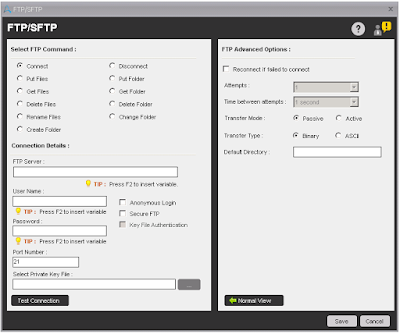
Components of Connect Sub-command:

  • FTP Server - Specify the FTP path where you want to connect.
  • User Name - User name of FTP server.
  • Password - Password of FTP server.
  • Port Number - Port number of FTP server. By default port number is 21. If you select 'Secure FTP' then port number changed to 22.
  • Anonymous Login - Select this option. if you want to login into FTP server Anonymously.
  • Secure FTP - Select this option, if you want to login into FTP server securely.
  • Key File Authentication - By default this option is disabled. When you select Secure FTP option, then this option will enable. Select this option, if you want to login into FTP server using Private key. When you select this option, then Password field marked as Optional and need to specify private key file in 'Select Private Key File' field.
  • In Advanced View Tab - You can select the options like Reconnect if failed to connect, Transfer Mode, default directory etc. If you select 'Secure FTP', then Transfer mode, Transfer Type and Default Directory options are not available.
    ftp command in automation anywhere, ftp, sftp, automation anywhere, automation anywhere 10.2, automation anywhere analytics, automation anywhere architecture, automation anywhere artificial intelligence, automation anywhere banking, automation anywhere blue prism, automation anywhere bots, automation anywhere case study, automation anywhere ceo, automation anywhere certification, automation anywhere citrix, automation anywhere coding, automation anywhere cognitive, automation anywhere control room, automation anywhere controls, automation anywhere course, automation anywhere create exe, automation anywhere dashboard, automation anywhere data extraction, automation anywhere database, automation anywhere deloitte, automation anywhere demo, automation anywhere demo videos, automation anywhere deployment, automation anywhere development, automation anywhere download, automation anywhere email, automation anywhere enterprise, automation anywhere enterprise manual, automation anywhere error handling, automation anywhere example, automation anywhere excel, automation anywhere exception handling, automation anywhere exe, automation anywhere extract data, automation anywhere extract table, automation anywhere for beginners, automation anywhere founder, automation anywhere framework, automation anywhere getting started, automation anywhere global variables, automation anywhere help, automation anywhere image recognition, automation anywhere installation, automation anywhere integration, automation anywhere interface, automation anywhere interview questions, automation anywhere introduction, automation anywhere ipo, automation anywhere iq bot, automation anywhere keystrokes, automation anywhere learn, automation anywhere list variable, automation anywhere mainframe, Automation anywhere certification,How to register for Automation anywhere certification?
    Connect

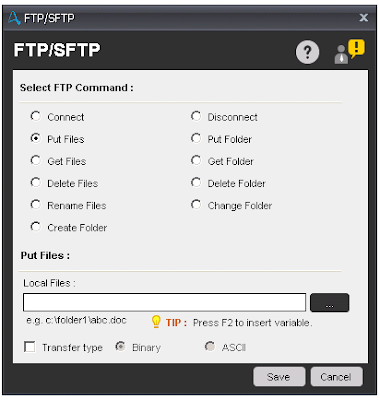
Components of Put Files Sub-command:

  • Put Files - Select the file(s) which you want to upload on FTP/SFTP server.
  • Transfer Type - Select the transfer type from Binary or ASCII.
    ftp command in automation anywhere, ftp, sftp, automation anywhere, automation anywhere 10.2, automation anywhere analytics, automation anywhere architecture, automation anywhere artificial intelligence, automation anywhere banking, automation anywhere blue prism, automation anywhere bots, automation anywhere case study, automation anywhere ceo, automation anywhere certification, automation anywhere citrix, automation anywhere coding, automation anywhere cognitive, automation anywhere control room, automation anywhere controls, automation anywhere course, automation anywhere create exe, automation anywhere dashboard, automation anywhere data extraction, automation anywhere database, automation anywhere deloitte, automation anywhere demo, automation anywhere demo videos, automation anywhere deployment, automation anywhere development, automation anywhere download, automation anywhere email, automation anywhere enterprise, automation anywhere enterprise manual, automation anywhere error handling, automation anywhere example, automation anywhere excel, automation anywhere exception handling, automation anywhere exe, automation anywhere extract data, automation anywhere extract table, automation anywhere for beginners, automation anywhere founder, automation anywhere framework, automation anywhere getting started, automation anywhere global variables, automation anywhere help, automation anywhere image recognition, automation anywhere installation, automation anywhere integration, automation anywhere interface, automation anywhere interview questions, automation anywhere introduction, automation anywhere ipo, automation anywhere iq bot, automation anywhere keystrokes, automation anywhere learn, automation anywhere list variable, automation anywhere mainframe, Automation anywhere certification,How to register for Automation anywhere certification?
    Put Files

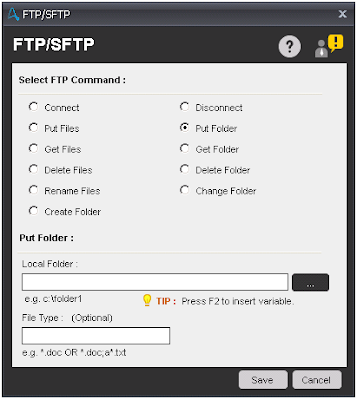
Components of Put Folder Sub-command:

  • Local Folder - Select Folder which you want to upload on FTP/SFTP server.
  • File Type - Enter File type which you want to upload along with folder.
    ftp command in automation anywhere, ftp, sftp, automation anywhere, automation anywhere 10.2, automation anywhere analytics, automation anywhere architecture, automation anywhere artificial intelligence, automation anywhere banking, automation anywhere blue prism, automation anywhere bots, automation anywhere case study, automation anywhere ceo, automation anywhere certification, automation anywhere citrix, automation anywhere coding, automation anywhere cognitive, automation anywhere control room, automation anywhere controls, automation anywhere course, automation anywhere create exe, automation anywhere dashboard, automation anywhere data extraction, automation anywhere database, automation anywhere deloitte, automation anywhere demo, automation anywhere demo videos, automation anywhere deployment, automation anywhere development, automation anywhere download, automation anywhere email, automation anywhere enterprise, automation anywhere enterprise manual, automation anywhere error handling, automation anywhere example, automation anywhere excel, automation anywhere exception handling, automation anywhere exe, automation anywhere extract data, automation anywhere extract table, automation anywhere for beginners, automation anywhere founder, automation anywhere framework, automation anywhere getting started, automation anywhere global variables, automation anywhere help, automation anywhere image recognition, automation anywhere installation, automation anywhere integration, automation anywhere interface, automation anywhere interview questions, automation anywhere introduction, automation anywhere ipo, automation anywhere iq bot, automation anywhere keystrokes, automation anywhere learn, automation anywhere list variable, automation anywhere mainframe, Automation anywhere certification,How to register for Automation anywhere certification?
    Put Folder

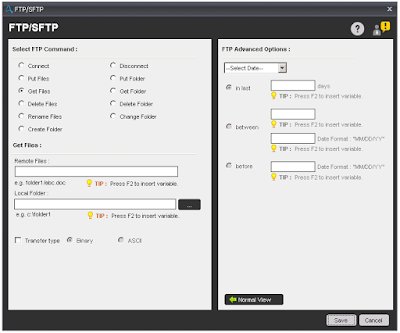
Components of Get Files Sub-command:

  • Remote Files - Select FTP server's files which you want to download on local system.
  • Local Folder - Select folder where you want to download files from FTP/SFTP server.
  • Transfer Type - Select the transfer type from Binary or ASCII.
    ftp command in automation anywhere, ftp, sftp, automation anywhere, automation anywhere 10.2, automation anywhere analytics, automation anywhere architecture, automation anywhere artificial intelligence, automation anywhere banking, automation anywhere blue prism, automation anywhere bots, automation anywhere case study, automation anywhere ceo, automation anywhere certification, automation anywhere citrix, automation anywhere coding, automation anywhere cognitive, automation anywhere control room, automation anywhere controls, automation anywhere course, automation anywhere create exe, automation anywhere dashboard, automation anywhere data extraction, automation anywhere database, automation anywhere deloitte, automation anywhere demo, automation anywhere demo videos, automation anywhere deployment, automation anywhere development, automation anywhere download, automation anywhere email, automation anywhere enterprise, automation anywhere enterprise manual, automation anywhere error handling, automation anywhere example, automation anywhere excel, automation anywhere exception handling, automation anywhere exe, automation anywhere extract data, automation anywhere extract table, automation anywhere for beginners, automation anywhere founder, automation anywhere framework, automation anywhere getting started, automation anywhere global variables, automation anywhere help, automation anywhere image recognition, automation anywhere installation, automation anywhere integration, automation anywhere interface, automation anywhere interview questions, automation anywhere introduction, automation anywhere ipo, automation anywhere iq bot, automation anywhere keystrokes, automation anywhere learn, automation anywhere list variable, automation anywhere mainframe, Automation anywhere certification,How to register for Automation anywhere certification?
    Get Files

Components of Get Folder Sub-command:

  • Remote Folder - Select FTP server's folder which you want to download on local system.
  • File Type - Enter File type which you want to download along with folder.
  • Local Folder - Select folder where you want to download files from FTP/SFTP server.
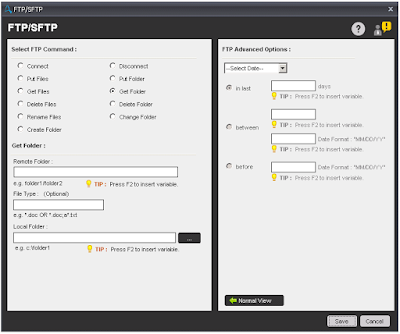
    ftp command in automation anywhere, ftp, sftp, automation anywhere, automation anywhere 10.2, automation anywhere analytics, automation anywhere architecture, automation anywhere artificial intelligence, automation anywhere banking, automation anywhere blue prism, automation anywhere bots, automation anywhere case study, automation anywhere ceo, automation anywhere certification, automation anywhere citrix, automation anywhere coding, automation anywhere cognitive, automation anywhere control room, automation anywhere controls, automation anywhere course, automation anywhere create exe, automation anywhere dashboard, automation anywhere data extraction, automation anywhere database, automation anywhere deloitte, automation anywhere demo, automation anywhere demo videos, automation anywhere deployment, automation anywhere development, automation anywhere download, automation anywhere email, automation anywhere enterprise, automation anywhere enterprise manual, automation anywhere error handling, automation anywhere example, automation anywhere excel, automation anywhere exception handling, automation anywhere exe, automation anywhere extract data, automation anywhere extract table, automation anywhere for beginners, automation anywhere founder, automation anywhere framework, automation anywhere getting started, automation anywhere global variables, automation anywhere help, automation anywhere image recognition, automation anywhere installation, automation anywhere integration, automation anywhere interface, automation anywhere interview questions, automation anywhere introduction, automation anywhere ipo, automation anywhere iq bot, automation anywhere keystrokes, automation anywhere learn, automation anywhere list variable, automation anywhere mainframe, Automation anywhere certification,How to register for Automation anywhere certification?
    Get Folder

Components of Delete Files/Folder Sub-command:

  • Remote Files/Folder - Select Files/Folder which you want to delete from FTP/SFTP server.
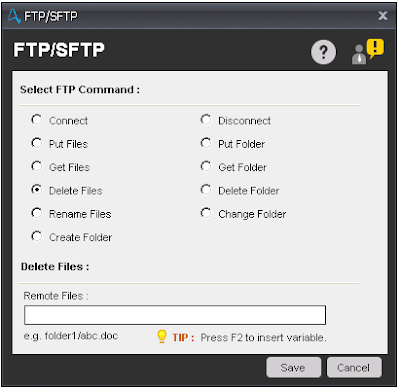
    ftp command in automation anywhere, ftp, sftp, automation anywhere, automation anywhere 10.2, automation anywhere analytics, automation anywhere architecture, automation anywhere artificial intelligence, automation anywhere banking, automation anywhere blue prism, automation anywhere bots, automation anywhere case study, automation anywhere ceo, automation anywhere certification, automation anywhere citrix, automation anywhere coding, automation anywhere cognitive, automation anywhere control room, automation anywhere controls, automation anywhere course, automation anywhere create exe, automation anywhere dashboard, automation anywhere data extraction, automation anywhere database, automation anywhere deloitte, automation anywhere demo, automation anywhere demo videos, automation anywhere deployment, automation anywhere development, automation anywhere download, automation anywhere email, automation anywhere enterprise, automation anywhere enterprise manual, automation anywhere error handling, automation anywhere example, automation anywhere excel, automation anywhere exception handling, automation anywhere exe, automation anywhere extract data, automation anywhere extract table, automation anywhere for beginners, automation anywhere founder, automation anywhere framework, automation anywhere getting started, automation anywhere global variables, automation anywhere help, automation anywhere image recognition, automation anywhere installation, automation anywhere integration, automation anywhere interface, automation anywhere interview questions, automation anywhere introduction, automation anywhere ipo, automation anywhere iq bot, automation anywhere keystrokes, automation anywhere learn, automation anywhere list variable, automation anywhere mainframe, Automation anywhere certification,How to register for Automation anywhere certification?
    Delete Files/Folder

Components of Rename Files Sub-command:

  • Remote Files - Select FTP server's files which you want to Rename.
  • New Remote Files - Enter new file name.
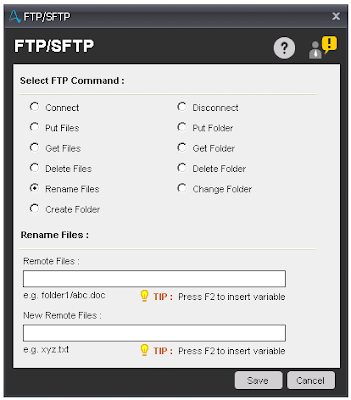
    ftp command in automation anywhere, ftp, sftp, automation anywhere, automation anywhere 10.2, automation anywhere analytics, automation anywhere architecture, automation anywhere artificial intelligence, automation anywhere banking, automation anywhere blue prism, automation anywhere bots, automation anywhere case study, automation anywhere ceo, automation anywhere certification, automation anywhere citrix, automation anywhere coding, automation anywhere cognitive, automation anywhere control room, automation anywhere controls, automation anywhere course, automation anywhere create exe, automation anywhere dashboard, automation anywhere data extraction, automation anywhere database, automation anywhere deloitte, automation anywhere demo, automation anywhere demo videos, automation anywhere deployment, automation anywhere development, automation anywhere download, automation anywhere email, automation anywhere enterprise, automation anywhere enterprise manual, automation anywhere error handling, automation anywhere example, automation anywhere excel, automation anywhere exception handling, automation anywhere exe, automation anywhere extract data, automation anywhere extract table, automation anywhere for beginners, automation anywhere founder, automation anywhere framework, automation anywhere getting started, automation anywhere global variables, automation anywhere help, automation anywhere image recognition, automation anywhere installation, automation anywhere integration, automation anywhere interface, automation anywhere interview questions, automation anywhere introduction, automation anywhere ipo, automation anywhere iq bot, automation anywhere keystrokes, automation anywhere learn, automation anywhere list variable, automation anywhere mainframe, Automation anywhere certification,How to register for Automation anywhere certification?
    Rename Files

Components of Change Folder Sub-command:

  • Go To Parent - Select this option if you want to move to parent directory on FTP server.
  • Specific Folder - Select this option and specify the path, if you want to move on some specific folder on FTP server.
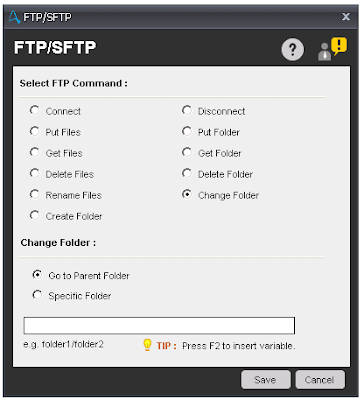
    ftp command in automation anywhere, ftp, sftp, automation anywhere, automation anywhere 10.2, automation anywhere analytics, automation anywhere architecture, automation anywhere artificial intelligence, automation anywhere banking, automation anywhere blue prism, automation anywhere bots, automation anywhere case study, automation anywhere ceo, automation anywhere certification, automation anywhere citrix, automation anywhere coding, automation anywhere cognitive, automation anywhere control room, automation anywhere controls, automation anywhere course, automation anywhere create exe, automation anywhere dashboard, automation anywhere data extraction, automation anywhere database, automation anywhere deloitte, automation anywhere demo, automation anywhere demo videos, automation anywhere deployment, automation anywhere development, automation anywhere download, automation anywhere email, automation anywhere enterprise, automation anywhere enterprise manual, automation anywhere error handling, automation anywhere example, automation anywhere excel, automation anywhere exception handling, automation anywhere exe, automation anywhere extract data, automation anywhere extract table, automation anywhere for beginners, automation anywhere founder, automation anywhere framework, automation anywhere getting started, automation anywhere global variables, automation anywhere help, automation anywhere image recognition, automation anywhere installation, automation anywhere integration, automation anywhere interface, automation anywhere interview questions, automation anywhere introduction, automation anywhere ipo, automation anywhere iq bot, automation anywhere keystrokes, automation anywhere learn, automation anywhere list variable, automation anywhere mainframe, Automation anywhere certification,How to register for Automation anywhere certification?
    Change Folder

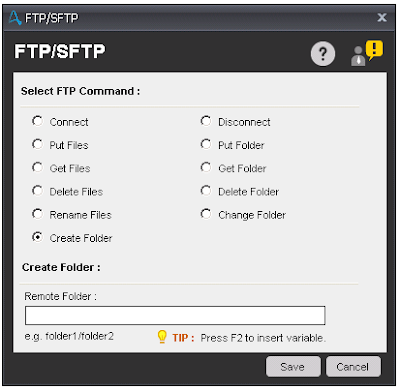
Components of Create Folder Sub-command:

  • Remote Folder - Enter the folder name with path to create a folder on FTP server.
    ftp command in automation anywhere, ftp, sftp, automation anywhere, automation anywhere 10.2, automation anywhere analytics, automation anywhere architecture, automation anywhere artificial intelligence, automation anywhere banking, automation anywhere blue prism, automation anywhere bots, automation anywhere case study, automation anywhere ceo, automation anywhere certification, automation anywhere citrix, automation anywhere coding, automation anywhere cognitive, automation anywhere control room, automation anywhere controls, automation anywhere course, automation anywhere create exe, automation anywhere dashboard, automation anywhere data extraction, automation anywhere database, automation anywhere deloitte, automation anywhere demo, automation anywhere demo videos, automation anywhere deployment, automation anywhere development, automation anywhere download, automation anywhere email, automation anywhere enterprise, automation anywhere enterprise manual, automation anywhere error handling, automation anywhere example, automation anywhere excel, automation anywhere exception handling, automation anywhere exe, automation anywhere extract data, automation anywhere extract table, automation anywhere for beginners, automation anywhere founder, automation anywhere framework, automation anywhere getting started, automation anywhere global variables, automation anywhere help, automation anywhere image recognition, automation anywhere installation, automation anywhere integration, automation anywhere interface, automation anywhere interview questions, automation anywhere introduction, automation anywhere ipo, automation anywhere iq bot, automation anywhere keystrokes, automation anywhere learn, automation anywhere list variable, automation anywhere mainframe, Automation anywhere certification,How to register for Automation anywhere certification?
    Create Folder

Note - To use this command, ensure that Visual C++ Redistributable for Visual Studio 2015 is installed on the Client machine.


Share:

Automation Anywhere - Excel Command

Automation Anywhere - Excel Command

excel command in automation anywhere, excel command, automation anywhere, automation anywhere 10.2, automation anywhere analytics, automation anywhere architecture, automation anywhere artificial intelligence, automation anywhere banking, automation anywhere blue prism, automation anywhere bots, automation anywhere case study, automation anywhere ceo, automation anywhere certification, automation anywhere citrix, automation anywhere coding, automation anywhere cognitive, automation anywhere control room, automation anywhere controls, automation anywhere course, automation anywhere create exe, automation anywhere dashboard, automation anywhere data extraction, automation anywhere database, automation anywhere deloitte, automation anywhere demo, automation anywhere demo videos, automation anywhere deployment, automation anywhere development, automation anywhere download, automation anywhere email, automation anywhere enterprise, automation anywhere enterprise manual, automation anywhere error handling, automation anywhere example, automation anywhere excel, automation anywhere exception handling, automation anywhere exe, automation anywhere extract data, automation anywhere extract table, automation anywhere for beginners, automation anywhere founder, automation anywhere framework, automation anywhere getting started, automation anywhere global variables, automation anywhere help, automation anywhere image recognition, automation anywhere installation, automation anywhere integration, automation anywhere interface, automation anywhere interview questions, automation anywhere introduction, automation anywhere ipo, automation anywhere iq bot, automation anywhere keystrokes, automation anywhere learn, automation anywhere list variable, automation anywhere mainframe, Automation anywhere certification,How to register for Automation anywhere certification?
Automation Anywhere

Excel Command

This command is use to transfer data to and from Microsoft Excel spreadsheets. Some common scenarios used in Excel automation:
  • Copying data from one Excel sheet to another.
  • Extracting data from an application to an Excel spreadsheet.
  • Extracting data from a website to an Excel spreadsheet.
  • Moving data from an Excel spreadsheet to another application.
  • Transfer data from Microsoft Access to Excel.
  • Transfer Excel data to a website form.
  • Delete rows or columns in Excel.
  • Compare two columns or to cells in a Excel spreadsheet etc.
Sub-commands
  • Open Spreadsheet - This command is use to open an Excel spreadsheet.
  • Close Spreadsheet - This command is use to close an opened Excel spreadsheet using excel session.
  • Activate Sheet - This command is use to Activate a particular sheet.
  • Get Cells - This command is use to get value and stored in a variable.
  • Set Cells - This command is use to set value in a particular cell.
  • Go To Cell - This command is use to move to specific cell.
  • Run Excel Macros - This command is use to Run macro in Excel spreadsheet.
  • Delete Cells - This command is use to Delete cell or row in a Excel spreadsheet.
  • Save Spreadsheet - This command is use to save an existing spreadsheet.
    excel command in automation anywhere, excel command, automation anywhere, automation anywhere 10.2, automation anywhere analytics, automation anywhere architecture, automation anywhere artificial intelligence, automation anywhere banking, automation anywhere blue prism, automation anywhere bots, automation anywhere case study, automation anywhere ceo, automation anywhere certification, automation anywhere citrix, automation anywhere coding, automation anywhere cognitive, automation anywhere control room, automation anywhere controls, automation anywhere course, automation anywhere create exe, automation anywhere dashboard, automation anywhere data extraction, automation anywhere database, automation anywhere deloitte, automation anywhere demo, automation anywhere demo videos, automation anywhere deployment, automation anywhere development, automation anywhere download, automation anywhere email, automation anywhere enterprise, automation anywhere enterprise manual, automation anywhere error handling, automation anywhere example, automation anywhere excel, automation anywhere exception handling, automation anywhere exe, automation anywhere extract data, automation anywhere extract table, automation anywhere for beginners, automation anywhere founder, automation anywhere framework, automation anywhere getting started, automation anywhere global variables, automation anywhere help, automation anywhere image recognition, automation anywhere installation, automation anywhere integration, automation anywhere interface, automation anywhere interview questions, automation anywhere introduction, automation anywhere ipo, automation anywhere iq bot, automation anywhere keystrokes, automation anywhere learn, automation anywhere list variable, automation anywhere mainframe, Automation anywhere certification,How to register for Automation anywhere certification?
    Save Spreadsheet
  • Find/Replace - This command is use to Find/Replace particular text. Output of this command is stored in list variable.
    excel command in automation anywhere, excel command, automation anywhere, automation anywhere 10.2, automation anywhere analytics, automation anywhere architecture, automation anywhere artificial intelligence, automation anywhere banking, automation anywhere blue prism, automation anywhere bots, automation anywhere case study, automation anywhere ceo, automation anywhere certification, automation anywhere citrix, automation anywhere coding, automation anywhere cognitive, automation anywhere control room, automation anywhere controls, automation anywhere course, automation anywhere create exe, automation anywhere dashboard, automation anywhere data extraction, automation anywhere database, automation anywhere deloitte, automation anywhere demo, automation anywhere demo videos, automation anywhere deployment, automation anywhere development, automation anywhere download, automation anywhere email, automation anywhere enterprise, automation anywhere enterprise manual, automation anywhere error handling, automation anywhere example, automation anywhere excel, automation anywhere exception handling, automation anywhere exe, automation anywhere extract data, automation anywhere extract table, automation anywhere for beginners, automation anywhere founder, automation anywhere framework, automation anywhere getting started, automation anywhere global variables, automation anywhere help, automation anywhere image recognition, automation anywhere installation, automation anywhere integration, automation anywhere interface, automation anywhere interview questions, automation anywhere introduction, automation anywhere ipo, automation anywhere iq bot, automation anywhere keystrokes, automation anywhere learn, automation anywhere list variable, automation anywhere mainframe, Automation anywhere certification,How to register for Automation anywhere certification?
    Find/Replace

Components of Open Spreadsheet sub-command:

  • Session Name - Specify the name of the session for Excel automation.
  • Spreadsheet Path - Enter or select Excel file with path.
  • Specific Sheet Name - Select this option and specify sheet name, if you want to work on specific sheet. By default, this option is unchecked and work on default excel sheet.
  • Contain Header - Select this option, if excel sheet contains header.
  • In Advanced View tab - If excel spreadsheet is password protected, then specify password of the spreadsheet.
    excel command in automation anywhere, excel command, automation anywhere, automation anywhere 10.2, automation anywhere analytics, automation anywhere architecture, automation anywhere artificial intelligence, automation anywhere banking, automation anywhere blue prism, automation anywhere bots, automation anywhere case study, automation anywhere ceo, automation anywhere certification, automation anywhere citrix, automation anywhere coding, automation anywhere cognitive, automation anywhere control room, automation anywhere controls, automation anywhere course, automation anywhere create exe, automation anywhere dashboard, automation anywhere data extraction, automation anywhere database, automation anywhere deloitte, automation anywhere demo, automation anywhere demo videos, automation anywhere deployment, automation anywhere development, automation anywhere download, automation anywhere email, automation anywhere enterprise, automation anywhere enterprise manual, automation anywhere error handling, automation anywhere example, automation anywhere excel, automation anywhere exception handling, automation anywhere exe, automation anywhere extract data, automation anywhere extract table, automation anywhere for beginners, automation anywhere founder, automation anywhere framework, automation anywhere getting started, automation anywhere global variables, automation anywhere help, automation anywhere image recognition, automation anywhere installation, automation anywhere integration, automation anywhere interface, automation anywhere interview questions, automation anywhere introduction, automation anywhere ipo, automation anywhere iq bot, automation anywhere keystrokes, automation anywhere learn, automation anywhere list variable, automation anywhere mainframe, Automation anywhere certification,How to register for Automation anywhere certification?
    Open Spreadsheet

Components of Activate Sheet sub-command:

  • Session Name - Specify the name of the session for Excel automation.
  • Sheet By Index - Select this option, if you want to activate sheet by Index. By default, this option is selected.
  • Sheet by Name - Select this option, if you want to activate sheet by Name.
    excel command in automation anywhere, excel command, automation anywhere, automation anywhere 10.2, automation anywhere analytics, automation anywhere architecture, automation anywhere artificial intelligence, automation anywhere banking, automation anywhere blue prism, automation anywhere bots, automation anywhere case study, automation anywhere ceo, automation anywhere certification, automation anywhere citrix, automation anywhere coding, automation anywhere cognitive, automation anywhere control room, automation anywhere controls, automation anywhere course, automation anywhere create exe, automation anywhere dashboard, automation anywhere data extraction, automation anywhere database, automation anywhere deloitte, automation anywhere demo, automation anywhere demo videos, automation anywhere deployment, automation anywhere development, automation anywhere download, automation anywhere email, automation anywhere enterprise, automation anywhere enterprise manual, automation anywhere error handling, automation anywhere example, automation anywhere excel, automation anywhere exception handling, automation anywhere exe, automation anywhere extract data, automation anywhere extract table, automation anywhere for beginners, automation anywhere founder, automation anywhere framework, automation anywhere getting started, automation anywhere global variables, automation anywhere help, automation anywhere image recognition, automation anywhere installation, automation anywhere integration, automation anywhere interface, automation anywhere interview questions, automation anywhere introduction, automation anywhere ipo, automation anywhere iq bot, automation anywhere keystrokes, automation anywhere learn, automation anywhere list variable, automation anywhere mainframe, Automation anywhere certification,How to register for Automation anywhere certification?
    Automation Anywhere

Components of Get Cells sub-command:

  • Get Cells -
    • Get Single Cell - Select this option, if you want to get value from a single cell and store.
    • Get Multiple Cells - Select this option, if you want to get value from multiple cells. To get the value of each cell, you need to use a loop command.
    • Get All Cells - Select this option, if you want to get value from excel sheet. To get the value of each cell, you need to use a loop command.
  • Session Name - Specify the name of the session for Excel automation.
  • Active Cell - Select this option, to get value from active cell. This option is visible, if you select 'Get Single Cell' option.
  • Specific Cell - Select this option and specify cell name to get value from specific cell. This option is visible, if you select 'Get Single Cell' option.
  • Assign - Assign output of the cell value.
  • From/To Specific cell - This option is visible, if you select 'Get Multiple Cells' option. Need to specify Cell range.
    excel command in automation anywhere, excel command, automation anywhere, automation anywhere 10.2, automation anywhere analytics, automation anywhere architecture, automation anywhere artificial intelligence, automation anywhere banking, automation anywhere blue prism, automation anywhere bots, automation anywhere case study, automation anywhere ceo, automation anywhere certification, automation anywhere citrix, automation anywhere coding, automation anywhere cognitive, automation anywhere control room, automation anywhere controls, automation anywhere course, automation anywhere create exe, automation anywhere dashboard, automation anywhere data extraction, automation anywhere database, automation anywhere deloitte, automation anywhere demo, automation anywhere demo videos, automation anywhere deployment, automation anywhere development, automation anywhere download, automation anywhere email, automation anywhere enterprise, automation anywhere enterprise manual, automation anywhere error handling, automation anywhere example, automation anywhere excel, automation anywhere exception handling, automation anywhere exe, automation anywhere extract data, automation anywhere extract table, automation anywhere for beginners, automation anywhere founder, automation anywhere framework, automation anywhere getting started, automation anywhere global variables, automation anywhere help, automation anywhere image recognition, automation anywhere installation, automation anywhere integration, automation anywhere interface, automation anywhere interview questions, automation anywhere introduction, automation anywhere ipo, automation anywhere iq bot, automation anywhere keystrokes, automation anywhere learn, automation anywhere list variable, automation anywhere mainframe, Automation anywhere certification,How to register for Automation anywhere certification?
    Get Cells

Components of Set Cell sub-command:

  • Session Name - Specify the name of the session for Excel automation.
  • Active Cell - Select this option, to set value in active cell.
  • Specific Cell - Select this option and specify cell name to set value in specific cell.
  • Cell Value - Specify the cell value you want to set.
    excel command in automation anywhere, excel command, automation anywhere, automation anywhere 10.2, automation anywhere analytics, automation anywhere architecture, automation anywhere artificial intelligence, automation anywhere banking, automation anywhere blue prism, automation anywhere bots, automation anywhere case study, automation anywhere ceo, automation anywhere certification, automation anywhere citrix, automation anywhere coding, automation anywhere cognitive, automation anywhere control room, automation anywhere controls, automation anywhere course, automation anywhere create exe, automation anywhere dashboard, automation anywhere data extraction, automation anywhere database, automation anywhere deloitte, automation anywhere demo, automation anywhere demo videos, automation anywhere deployment, automation anywhere development, automation anywhere download, automation anywhere email, automation anywhere enterprise, automation anywhere enterprise manual, automation anywhere error handling, automation anywhere example, automation anywhere excel, automation anywhere exception handling, automation anywhere exe, automation anywhere extract data, automation anywhere extract table, automation anywhere for beginners, automation anywhere founder, automation anywhere framework, automation anywhere getting started, automation anywhere global variables, automation anywhere help, automation anywhere image recognition, automation anywhere installation, automation anywhere integration, automation anywhere interface, automation anywhere interview questions, automation anywhere introduction, automation anywhere ipo, automation anywhere iq bot, automation anywhere keystrokes, automation anywhere learn, automation anywhere list variable, automation anywhere mainframe, Automation anywhere certification,How to register for Automation anywhere certification?
    Set Cells

Components of Go To Cell sub-command:

  • Session Name - Specify the name of the session for Excel automation.
  • Specific Cell - Select this option and specify cell name to move to specific cell. Other available options are:
    • One cell to left - Move one cell left of the active cell.
    • One cell to right - Move one cell right of the active cell.
    • One cell above - Move one cell above the active cell.
    • One cell below - Move one cell below the active cell.
    • Beginning of the row - Move to the beginning of the active cell's row.
    • End of the row - Move to End of the active cell's row.
    • Beginning of the column - Move to beginning of the active cell's column.
    • End of the column - Move to End of the active cell's column.
      excel command in automation anywhere, excel command, automation anywhere, automation anywhere 10.2, automation anywhere analytics, automation anywhere architecture, automation anywhere artificial intelligence, automation anywhere banking, automation anywhere blue prism, automation anywhere bots, automation anywhere case study, automation anywhere ceo, automation anywhere certification, automation anywhere citrix, automation anywhere coding, automation anywhere cognitive, automation anywhere control room, automation anywhere controls, automation anywhere course, automation anywhere create exe, automation anywhere dashboard, automation anywhere data extraction, automation anywhere database, automation anywhere deloitte, automation anywhere demo, automation anywhere demo videos, automation anywhere deployment, automation anywhere development, automation anywhere download, automation anywhere email, automation anywhere enterprise, automation anywhere enterprise manual, automation anywhere error handling, automation anywhere example, automation anywhere excel, automation anywhere exception handling, automation anywhere exe, automation anywhere extract data, automation anywhere extract table, automation anywhere for beginners, automation anywhere founder, automation anywhere framework, automation anywhere getting started, automation anywhere global variables, automation anywhere help, automation anywhere image recognition, automation anywhere installation, automation anywhere integration, automation anywhere interface, automation anywhere interview questions, automation anywhere introduction, automation anywhere ipo, automation anywhere iq bot, automation anywhere keystrokes, automation anywhere learn, automation anywhere list variable, automation anywhere mainframe, Automation anywhere certification,How to register for Automation anywhere certification?
      Go To Cell

Note - In Active cell, End of the row/column refers to "end of the row/column where the data ends"; not end of the spreadsheet row/column.

Components of Run Macro sub-command:

  • Session Name - Specify the name of the session for Excel automation.
  • Macro Name - Enter the name of Macro you want to Execute.
  • Macro Arguments - Specify parameter(s) of the macro, if any.
    excel command in automation anywhere, excel command, automation anywhere, automation anywhere 10.2, automation anywhere analytics, automation anywhere architecture, automation anywhere artificial intelligence, automation anywhere banking, automation anywhere blue prism, automation anywhere bots, automation anywhere case study, automation anywhere ceo, automation anywhere certification, automation anywhere citrix, automation anywhere coding, automation anywhere cognitive, automation anywhere control room, automation anywhere controls, automation anywhere course, automation anywhere create exe, automation anywhere dashboard, automation anywhere data extraction, automation anywhere database, automation anywhere deloitte, automation anywhere demo, automation anywhere demo videos, automation anywhere deployment, automation anywhere development, automation anywhere download, automation anywhere email, automation anywhere enterprise, automation anywhere enterprise manual, automation anywhere error handling, automation anywhere example, automation anywhere excel, automation anywhere exception handling, automation anywhere exe, automation anywhere extract data, automation anywhere extract table, automation anywhere for beginners, automation anywhere founder, automation anywhere framework, automation anywhere getting started, automation anywhere global variables, automation anywhere help, automation anywhere image recognition, automation anywhere installation, automation anywhere integration, automation anywhere interface, automation anywhere interview questions, automation anywhere introduction, automation anywhere ipo, automation anywhere iq bot, automation anywhere keystrokes, automation anywhere learn, automation anywhere list variable, automation anywhere mainframe, Automation anywhere certification,How to register for Automation anywhere certification?
    Run Excel Macro

Components of Delete Cells sub-command:

  • Session Name - Specify the name of the session for Excel automation.
  • Active Cell - Select this option, to delete active cell.
  • Specific Cell - Select this option and specify cell name to delete specific cell.
  • Delete Option - Select any option to delete the cell/row/column.
    • Shift cells left
    • Shift cells up
    • Entire row
    • Entire column
      excel command in automation anywhere, excel command, automation anywhere, automation anywhere 10.2, automation anywhere analytics, automation anywhere architecture, automation anywhere artificial intelligence, automation anywhere banking, automation anywhere blue prism, automation anywhere bots, automation anywhere case study, automation anywhere ceo, automation anywhere certification, automation anywhere citrix, automation anywhere coding, automation anywhere cognitive, automation anywhere control room, automation anywhere controls, automation anywhere course, automation anywhere create exe, automation anywhere dashboard, automation anywhere data extraction, automation anywhere database, automation anywhere deloitte, automation anywhere demo, automation anywhere demo videos, automation anywhere deployment, automation anywhere development, automation anywhere download, automation anywhere email, automation anywhere enterprise, automation anywhere enterprise manual, automation anywhere error handling, automation anywhere example, automation anywhere excel, automation anywhere exception handling, automation anywhere exe, automation anywhere extract data, automation anywhere extract table, automation anywhere for beginners, automation anywhere founder, automation anywhere framework, automation anywhere getting started, automation anywhere global variables, automation anywhere help, automation anywhere image recognition, automation anywhere installation, automation anywhere integration, automation anywhere interface, automation anywhere interview questions, automation anywhere introduction, automation anywhere ipo, automation anywhere iq bot, automation anywhere keystrokes, automation anywhere learn, automation anywhere list variable, automation anywhere mainframe, Automation anywhere certification,How to register for Automation anywhere certification?
      Delete Cells
Share:

Popular Posts

Blog Archive

Total Pageviews

Recent Posts