Automation Anywhere - Excel Command

Automation Anywhere - Excel Command

excel command in automation anywhere, excel command, automation anywhere, automation anywhere 10.2, automation anywhere analytics, automation anywhere architecture, automation anywhere artificial intelligence, automation anywhere banking, automation anywhere blue prism, automation anywhere bots, automation anywhere case study, automation anywhere ceo, automation anywhere certification, automation anywhere citrix, automation anywhere coding, automation anywhere cognitive, automation anywhere control room, automation anywhere controls, automation anywhere course, automation anywhere create exe, automation anywhere dashboard, automation anywhere data extraction, automation anywhere database, automation anywhere deloitte, automation anywhere demo, automation anywhere demo videos, automation anywhere deployment, automation anywhere development, automation anywhere download, automation anywhere email, automation anywhere enterprise, automation anywhere enterprise manual, automation anywhere error handling, automation anywhere example, automation anywhere excel, automation anywhere exception handling, automation anywhere exe, automation anywhere extract data, automation anywhere extract table, automation anywhere for beginners, automation anywhere founder, automation anywhere framework, automation anywhere getting started, automation anywhere global variables, automation anywhere help, automation anywhere image recognition, automation anywhere installation, automation anywhere integration, automation anywhere interface, automation anywhere interview questions, automation anywhere introduction, automation anywhere ipo, automation anywhere iq bot, automation anywhere keystrokes, automation anywhere learn, automation anywhere list variable, automation anywhere mainframe, Automation anywhere certification,How to register for Automation anywhere certification?
Automation Anywhere

Excel Command

This command is use to transfer data to and from Microsoft Excel spreadsheets. Some common scenarios used in Excel automation:
  • Copying data from one Excel sheet to another.
  • Extracting data from an application to an Excel spreadsheet.
  • Extracting data from a website to an Excel spreadsheet.
  • Moving data from an Excel spreadsheet to another application.
  • Transfer data from Microsoft Access to Excel.
  • Transfer Excel data to a website form.
  • Delete rows or columns in Excel.
  • Compare two columns or to cells in a Excel spreadsheet etc.
Sub-commands
  • Open Spreadsheet - This command is use to open an Excel spreadsheet.
  • Close Spreadsheet - This command is use to close an opened Excel spreadsheet using excel session.
  • Activate Sheet - This command is use to Activate a particular sheet.
  • Get Cells - This command is use to get value and stored in a variable.
  • Set Cells - This command is use to set value in a particular cell.
  • Go To Cell - This command is use to move to specific cell.
  • Run Excel Macros - This command is use to Run macro in Excel spreadsheet.
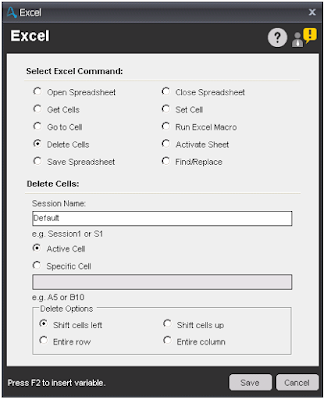
  • Delete Cells - This command is use to Delete cell or row in a Excel spreadsheet.
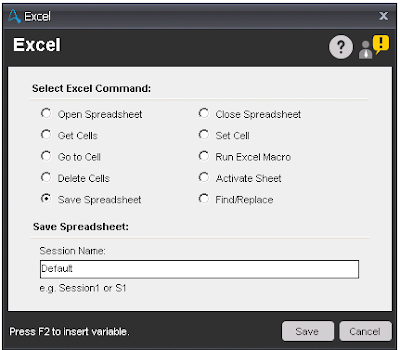
  • Save Spreadsheet - This command is use to save an existing spreadsheet.
    excel command in automation anywhere, excel command, automation anywhere, automation anywhere 10.2, automation anywhere analytics, automation anywhere architecture, automation anywhere artificial intelligence, automation anywhere banking, automation anywhere blue prism, automation anywhere bots, automation anywhere case study, automation anywhere ceo, automation anywhere certification, automation anywhere citrix, automation anywhere coding, automation anywhere cognitive, automation anywhere control room, automation anywhere controls, automation anywhere course, automation anywhere create exe, automation anywhere dashboard, automation anywhere data extraction, automation anywhere database, automation anywhere deloitte, automation anywhere demo, automation anywhere demo videos, automation anywhere deployment, automation anywhere development, automation anywhere download, automation anywhere email, automation anywhere enterprise, automation anywhere enterprise manual, automation anywhere error handling, automation anywhere example, automation anywhere excel, automation anywhere exception handling, automation anywhere exe, automation anywhere extract data, automation anywhere extract table, automation anywhere for beginners, automation anywhere founder, automation anywhere framework, automation anywhere getting started, automation anywhere global variables, automation anywhere help, automation anywhere image recognition, automation anywhere installation, automation anywhere integration, automation anywhere interface, automation anywhere interview questions, automation anywhere introduction, automation anywhere ipo, automation anywhere iq bot, automation anywhere keystrokes, automation anywhere learn, automation anywhere list variable, automation anywhere mainframe, Automation anywhere certification,How to register for Automation anywhere certification?
    Save Spreadsheet
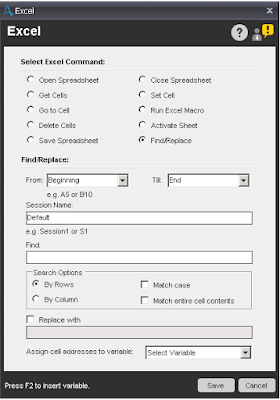
  • Find/Replace - This command is use to Find/Replace particular text. Output of this command is stored in list variable.
    excel command in automation anywhere, excel command, automation anywhere, automation anywhere 10.2, automation anywhere analytics, automation anywhere architecture, automation anywhere artificial intelligence, automation anywhere banking, automation anywhere blue prism, automation anywhere bots, automation anywhere case study, automation anywhere ceo, automation anywhere certification, automation anywhere citrix, automation anywhere coding, automation anywhere cognitive, automation anywhere control room, automation anywhere controls, automation anywhere course, automation anywhere create exe, automation anywhere dashboard, automation anywhere data extraction, automation anywhere database, automation anywhere deloitte, automation anywhere demo, automation anywhere demo videos, automation anywhere deployment, automation anywhere development, automation anywhere download, automation anywhere email, automation anywhere enterprise, automation anywhere enterprise manual, automation anywhere error handling, automation anywhere example, automation anywhere excel, automation anywhere exception handling, automation anywhere exe, automation anywhere extract data, automation anywhere extract table, automation anywhere for beginners, automation anywhere founder, automation anywhere framework, automation anywhere getting started, automation anywhere global variables, automation anywhere help, automation anywhere image recognition, automation anywhere installation, automation anywhere integration, automation anywhere interface, automation anywhere interview questions, automation anywhere introduction, automation anywhere ipo, automation anywhere iq bot, automation anywhere keystrokes, automation anywhere learn, automation anywhere list variable, automation anywhere mainframe, Automation anywhere certification,How to register for Automation anywhere certification?
    Find/Replace

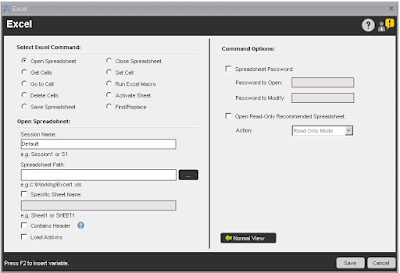
Components of Open Spreadsheet sub-command:

  • Session Name - Specify the name of the session for Excel automation.
  • Spreadsheet Path - Enter or select Excel file with path.
  • Specific Sheet Name - Select this option and specify sheet name, if you want to work on specific sheet. By default, this option is unchecked and work on default excel sheet.
  • Contain Header - Select this option, if excel sheet contains header.
  • In Advanced View tab - If excel spreadsheet is password protected, then specify password of the spreadsheet.
    excel command in automation anywhere, excel command, automation anywhere, automation anywhere 10.2, automation anywhere analytics, automation anywhere architecture, automation anywhere artificial intelligence, automation anywhere banking, automation anywhere blue prism, automation anywhere bots, automation anywhere case study, automation anywhere ceo, automation anywhere certification, automation anywhere citrix, automation anywhere coding, automation anywhere cognitive, automation anywhere control room, automation anywhere controls, automation anywhere course, automation anywhere create exe, automation anywhere dashboard, automation anywhere data extraction, automation anywhere database, automation anywhere deloitte, automation anywhere demo, automation anywhere demo videos, automation anywhere deployment, automation anywhere development, automation anywhere download, automation anywhere email, automation anywhere enterprise, automation anywhere enterprise manual, automation anywhere error handling, automation anywhere example, automation anywhere excel, automation anywhere exception handling, automation anywhere exe, automation anywhere extract data, automation anywhere extract table, automation anywhere for beginners, automation anywhere founder, automation anywhere framework, automation anywhere getting started, automation anywhere global variables, automation anywhere help, automation anywhere image recognition, automation anywhere installation, automation anywhere integration, automation anywhere interface, automation anywhere interview questions, automation anywhere introduction, automation anywhere ipo, automation anywhere iq bot, automation anywhere keystrokes, automation anywhere learn, automation anywhere list variable, automation anywhere mainframe, Automation anywhere certification,How to register for Automation anywhere certification?
    Open Spreadsheet

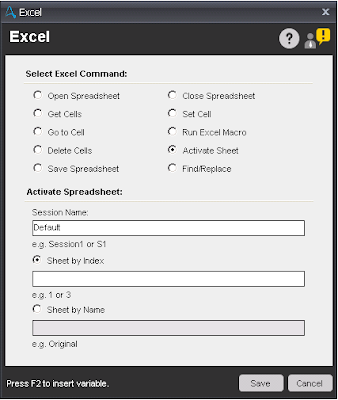
Components of Activate Sheet sub-command:

  • Session Name - Specify the name of the session for Excel automation.
  • Sheet By Index - Select this option, if you want to activate sheet by Index. By default, this option is selected.
  • Sheet by Name - Select this option, if you want to activate sheet by Name.
    excel command in automation anywhere, excel command, automation anywhere, automation anywhere 10.2, automation anywhere analytics, automation anywhere architecture, automation anywhere artificial intelligence, automation anywhere banking, automation anywhere blue prism, automation anywhere bots, automation anywhere case study, automation anywhere ceo, automation anywhere certification, automation anywhere citrix, automation anywhere coding, automation anywhere cognitive, automation anywhere control room, automation anywhere controls, automation anywhere course, automation anywhere create exe, automation anywhere dashboard, automation anywhere data extraction, automation anywhere database, automation anywhere deloitte, automation anywhere demo, automation anywhere demo videos, automation anywhere deployment, automation anywhere development, automation anywhere download, automation anywhere email, automation anywhere enterprise, automation anywhere enterprise manual, automation anywhere error handling, automation anywhere example, automation anywhere excel, automation anywhere exception handling, automation anywhere exe, automation anywhere extract data, automation anywhere extract table, automation anywhere for beginners, automation anywhere founder, automation anywhere framework, automation anywhere getting started, automation anywhere global variables, automation anywhere help, automation anywhere image recognition, automation anywhere installation, automation anywhere integration, automation anywhere interface, automation anywhere interview questions, automation anywhere introduction, automation anywhere ipo, automation anywhere iq bot, automation anywhere keystrokes, automation anywhere learn, automation anywhere list variable, automation anywhere mainframe, Automation anywhere certification,How to register for Automation anywhere certification?
    Automation Anywhere

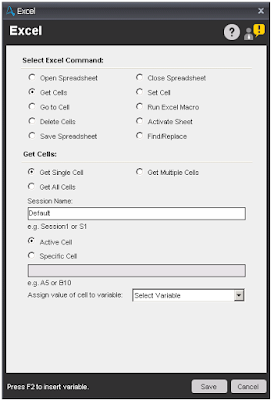
Components of Get Cells sub-command:

  • Get Cells -
    • Get Single Cell - Select this option, if you want to get value from a single cell and store.
    • Get Multiple Cells - Select this option, if you want to get value from multiple cells. To get the value of each cell, you need to use a loop command.
    • Get All Cells - Select this option, if you want to get value from excel sheet. To get the value of each cell, you need to use a loop command.
  • Session Name - Specify the name of the session for Excel automation.
  • Active Cell - Select this option, to get value from active cell. This option is visible, if you select 'Get Single Cell' option.
  • Specific Cell - Select this option and specify cell name to get value from specific cell. This option is visible, if you select 'Get Single Cell' option.
  • Assign - Assign output of the cell value.
  • From/To Specific cell - This option is visible, if you select 'Get Multiple Cells' option. Need to specify Cell range.
    excel command in automation anywhere, excel command, automation anywhere, automation anywhere 10.2, automation anywhere analytics, automation anywhere architecture, automation anywhere artificial intelligence, automation anywhere banking, automation anywhere blue prism, automation anywhere bots, automation anywhere case study, automation anywhere ceo, automation anywhere certification, automation anywhere citrix, automation anywhere coding, automation anywhere cognitive, automation anywhere control room, automation anywhere controls, automation anywhere course, automation anywhere create exe, automation anywhere dashboard, automation anywhere data extraction, automation anywhere database, automation anywhere deloitte, automation anywhere demo, automation anywhere demo videos, automation anywhere deployment, automation anywhere development, automation anywhere download, automation anywhere email, automation anywhere enterprise, automation anywhere enterprise manual, automation anywhere error handling, automation anywhere example, automation anywhere excel, automation anywhere exception handling, automation anywhere exe, automation anywhere extract data, automation anywhere extract table, automation anywhere for beginners, automation anywhere founder, automation anywhere framework, automation anywhere getting started, automation anywhere global variables, automation anywhere help, automation anywhere image recognition, automation anywhere installation, automation anywhere integration, automation anywhere interface, automation anywhere interview questions, automation anywhere introduction, automation anywhere ipo, automation anywhere iq bot, automation anywhere keystrokes, automation anywhere learn, automation anywhere list variable, automation anywhere mainframe, Automation anywhere certification,How to register for Automation anywhere certification?
    Get Cells

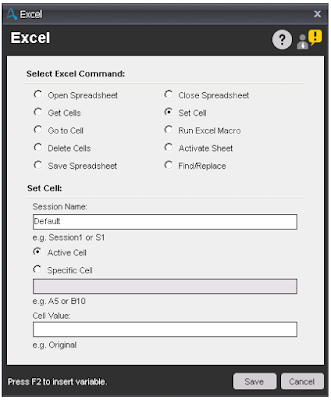
Components of Set Cell sub-command:

  • Session Name - Specify the name of the session for Excel automation.
  • Active Cell - Select this option, to set value in active cell.
  • Specific Cell - Select this option and specify cell name to set value in specific cell.
  • Cell Value - Specify the cell value you want to set.
    excel command in automation anywhere, excel command, automation anywhere, automation anywhere 10.2, automation anywhere analytics, automation anywhere architecture, automation anywhere artificial intelligence, automation anywhere banking, automation anywhere blue prism, automation anywhere bots, automation anywhere case study, automation anywhere ceo, automation anywhere certification, automation anywhere citrix, automation anywhere coding, automation anywhere cognitive, automation anywhere control room, automation anywhere controls, automation anywhere course, automation anywhere create exe, automation anywhere dashboard, automation anywhere data extraction, automation anywhere database, automation anywhere deloitte, automation anywhere demo, automation anywhere demo videos, automation anywhere deployment, automation anywhere development, automation anywhere download, automation anywhere email, automation anywhere enterprise, automation anywhere enterprise manual, automation anywhere error handling, automation anywhere example, automation anywhere excel, automation anywhere exception handling, automation anywhere exe, automation anywhere extract data, automation anywhere extract table, automation anywhere for beginners, automation anywhere founder, automation anywhere framework, automation anywhere getting started, automation anywhere global variables, automation anywhere help, automation anywhere image recognition, automation anywhere installation, automation anywhere integration, automation anywhere interface, automation anywhere interview questions, automation anywhere introduction, automation anywhere ipo, automation anywhere iq bot, automation anywhere keystrokes, automation anywhere learn, automation anywhere list variable, automation anywhere mainframe, Automation anywhere certification,How to register for Automation anywhere certification?
    Set Cells

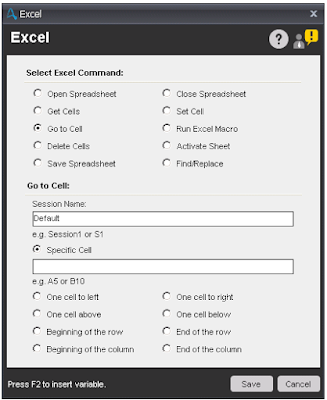
Components of Go To Cell sub-command:

  • Session Name - Specify the name of the session for Excel automation.
  • Specific Cell - Select this option and specify cell name to move to specific cell. Other available options are:
    • One cell to left - Move one cell left of the active cell.
    • One cell to right - Move one cell right of the active cell.
    • One cell above - Move one cell above the active cell.
    • One cell below - Move one cell below the active cell.
    • Beginning of the row - Move to the beginning of the active cell's row.
    • End of the row - Move to End of the active cell's row.
    • Beginning of the column - Move to beginning of the active cell's column.
    • End of the column - Move to End of the active cell's column.
      excel command in automation anywhere, excel command, automation anywhere, automation anywhere 10.2, automation anywhere analytics, automation anywhere architecture, automation anywhere artificial intelligence, automation anywhere banking, automation anywhere blue prism, automation anywhere bots, automation anywhere case study, automation anywhere ceo, automation anywhere certification, automation anywhere citrix, automation anywhere coding, automation anywhere cognitive, automation anywhere control room, automation anywhere controls, automation anywhere course, automation anywhere create exe, automation anywhere dashboard, automation anywhere data extraction, automation anywhere database, automation anywhere deloitte, automation anywhere demo, automation anywhere demo videos, automation anywhere deployment, automation anywhere development, automation anywhere download, automation anywhere email, automation anywhere enterprise, automation anywhere enterprise manual, automation anywhere error handling, automation anywhere example, automation anywhere excel, automation anywhere exception handling, automation anywhere exe, automation anywhere extract data, automation anywhere extract table, automation anywhere for beginners, automation anywhere founder, automation anywhere framework, automation anywhere getting started, automation anywhere global variables, automation anywhere help, automation anywhere image recognition, automation anywhere installation, automation anywhere integration, automation anywhere interface, automation anywhere interview questions, automation anywhere introduction, automation anywhere ipo, automation anywhere iq bot, automation anywhere keystrokes, automation anywhere learn, automation anywhere list variable, automation anywhere mainframe, Automation anywhere certification,How to register for Automation anywhere certification?
      Go To Cell

Note - In Active cell, End of the row/column refers to "end of the row/column where the data ends"; not end of the spreadsheet row/column.

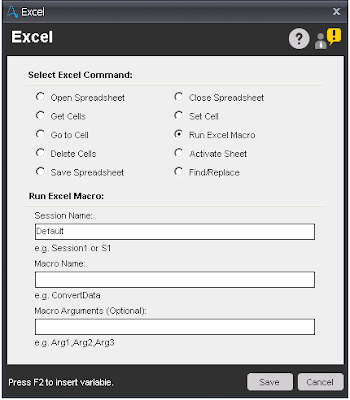
Components of Run Macro sub-command:

  • Session Name - Specify the name of the session for Excel automation.
  • Macro Name - Enter the name of Macro you want to Execute.
  • Macro Arguments - Specify parameter(s) of the macro, if any.
    excel command in automation anywhere, excel command, automation anywhere, automation anywhere 10.2, automation anywhere analytics, automation anywhere architecture, automation anywhere artificial intelligence, automation anywhere banking, automation anywhere blue prism, automation anywhere bots, automation anywhere case study, automation anywhere ceo, automation anywhere certification, automation anywhere citrix, automation anywhere coding, automation anywhere cognitive, automation anywhere control room, automation anywhere controls, automation anywhere course, automation anywhere create exe, automation anywhere dashboard, automation anywhere data extraction, automation anywhere database, automation anywhere deloitte, automation anywhere demo, automation anywhere demo videos, automation anywhere deployment, automation anywhere development, automation anywhere download, automation anywhere email, automation anywhere enterprise, automation anywhere enterprise manual, automation anywhere error handling, automation anywhere example, automation anywhere excel, automation anywhere exception handling, automation anywhere exe, automation anywhere extract data, automation anywhere extract table, automation anywhere for beginners, automation anywhere founder, automation anywhere framework, automation anywhere getting started, automation anywhere global variables, automation anywhere help, automation anywhere image recognition, automation anywhere installation, automation anywhere integration, automation anywhere interface, automation anywhere interview questions, automation anywhere introduction, automation anywhere ipo, automation anywhere iq bot, automation anywhere keystrokes, automation anywhere learn, automation anywhere list variable, automation anywhere mainframe, Automation anywhere certification,How to register for Automation anywhere certification?
    Run Excel Macro

Components of Delete Cells sub-command:

  • Session Name - Specify the name of the session for Excel automation.
  • Active Cell - Select this option, to delete active cell.
  • Specific Cell - Select this option and specify cell name to delete specific cell.
  • Delete Option - Select any option to delete the cell/row/column.
    • Shift cells left
    • Shift cells up
    • Entire row
    • Entire column
      excel command in automation anywhere, excel command, automation anywhere, automation anywhere 10.2, automation anywhere analytics, automation anywhere architecture, automation anywhere artificial intelligence, automation anywhere banking, automation anywhere blue prism, automation anywhere bots, automation anywhere case study, automation anywhere ceo, automation anywhere certification, automation anywhere citrix, automation anywhere coding, automation anywhere cognitive, automation anywhere control room, automation anywhere controls, automation anywhere course, automation anywhere create exe, automation anywhere dashboard, automation anywhere data extraction, automation anywhere database, automation anywhere deloitte, automation anywhere demo, automation anywhere demo videos, automation anywhere deployment, automation anywhere development, automation anywhere download, automation anywhere email, automation anywhere enterprise, automation anywhere enterprise manual, automation anywhere error handling, automation anywhere example, automation anywhere excel, automation anywhere exception handling, automation anywhere exe, automation anywhere extract data, automation anywhere extract table, automation anywhere for beginners, automation anywhere founder, automation anywhere framework, automation anywhere getting started, automation anywhere global variables, automation anywhere help, automation anywhere image recognition, automation anywhere installation, automation anywhere integration, automation anywhere interface, automation anywhere interview questions, automation anywhere introduction, automation anywhere ipo, automation anywhere iq bot, automation anywhere keystrokes, automation anywhere learn, automation anywhere list variable, automation anywhere mainframe, Automation anywhere certification,How to register for Automation anywhere certification?
      Delete Cells
Share:

Automation Anywhere - Object Cloning Command

Automation Anywhere - Object Cloning Command

Object cloning command in automation anywhere, object cloning, object cloning command, legacy technology, legacy technology in automation anywhere, automation anywhere, automation anywhere 10.2, automation anywhere analytics, automation anywhere architecture, automation anywhere artificial intelligence, automation anywhere banking, automation anywhere blue prism, automation anywhere bots, automation anywhere case study, automation anywhere ceo, automation anywhere certification, automation anywhere citrix, automation anywhere coding, automation anywhere cognitive, automation anywhere control room, automation anywhere controls, automation anywhere course, automation anywhere create exe, automation anywhere dashboard, automation anywhere data extraction, automation anywhere database, automation anywhere deloitte, automation anywhere demo, automation anywhere demo videos, automation anywhere deployment, automation anywhere development, automation anywhere download, automation anywhere email, automation anywhere enterprise, automation anywhere enterprise manual, automation anywhere error handling, automation anywhere example, automation anywhere excel, automation anywhere exception handling, automation anywhere exe, automation anywhere extract data, automation anywhere extract table, automation anywhere for beginners, automation anywhere founder, automation anywhere framework, automation anywhere getting started, automation anywhere global variables, automation anywhere help, automation anywhere image recognition, automation anywhere installation, automation anywhere integration, automation anywhere interface, automation anywhere interview questions, automation anywhere introduction, automation anywhere ipo, automation anywhere iq bot, automation anywhere keystrokes, automation anywhere learn, automation anywhere list variable, automation anywhere mainframe, Automation anywhere certification,How to register for Automation anywhere certification?
Automation Anywhere

Object Cloning Command

This command is use to capture objects within windows that use technologies such as Flex, Silverlight, Java and HTML etc. Using this command, you can capture objects, its co-ordinates and images.

Components of Object Cloning Command

    • Select Window - This option is use to select window title which you want to capture an objects and its parameters such as co-ordinates and image.
    • Capture - Hold the mouse and drag it to the object to capture.
    • Play Mode - Select the mode to capture. In Object cloning we have three different play mode are available are:
      • Object - You can use this play mode to capture objects based on Microsoft Windows, HTML, JAVA, and FLEX technologies.
        Object cloning command in automation anywhere, object cloning, object cloning command, legacy technology, legacy technology in automation anywhere, automation anywhere, automation anywhere 10.2, automation anywhere analytics, automation anywhere architecture, automation anywhere artificial intelligence, automation anywhere banking, automation anywhere blue prism, automation anywhere bots, automation anywhere case study, automation anywhere ceo, automation anywhere certification, automation anywhere citrix, automation anywhere coding, automation anywhere cognitive, automation anywhere control room, automation anywhere controls, automation anywhere course, automation anywhere create exe, automation anywhere dashboard, automation anywhere data extraction, automation anywhere database, automation anywhere deloitte, automation anywhere demo, automation anywhere demo videos, automation anywhere deployment, automation anywhere development, automation anywhere download, automation anywhere email, automation anywhere enterprise, automation anywhere enterprise manual, automation anywhere error handling, automation anywhere example, automation anywhere excel, automation anywhere exception handling, automation anywhere exe, automation anywhere extract data, automation anywhere extract table, automation anywhere for beginners, automation anywhere founder, automation anywhere framework, automation anywhere getting started, automation anywhere global variables, automation anywhere help, automation anywhere image recognition, automation anywhere installation, automation anywhere integration, automation anywhere interface, automation anywhere interview questions, automation anywhere introduction, automation anywhere ipo, automation anywhere iq bot, automation anywhere keystrokes, automation anywhere learn, automation anywhere list variable, automation anywhere mainframe, Automation anywhere certification,How to register for Automation anywhere certification?
        Object Mode
      • Coordinates - This play mode enables you to capture coordinates of an object. It is useful in a window that has objects invisible to the capturing technology, for example, a Remote Desktop window or a Citrix application.
        Object cloning command in automation anywhere, object cloning, object cloning command, legacy technology, legacy technology in automation anywhere, automation anywhere, automation anywhere 10.2, automation anywhere analytics, automation anywhere architecture, automation anywhere artificial intelligence, automation anywhere banking, automation anywhere blue prism, automation anywhere bots, automation anywhere case study, automation anywhere ceo, automation anywhere certification, automation anywhere citrix, automation anywhere coding, automation anywhere cognitive, automation anywhere control room, automation anywhere controls, automation anywhere course, automation anywhere create exe, automation anywhere dashboard, automation anywhere data extraction, automation anywhere database, automation anywhere deloitte, automation anywhere demo, automation anywhere demo videos, automation anywhere deployment, automation anywhere development, automation anywhere download, automation anywhere email, automation anywhere enterprise, automation anywhere enterprise manual, automation anywhere error handling, automation anywhere example, automation anywhere excel, automation anywhere exception handling, automation anywhere exe, automation anywhere extract data, automation anywhere extract table, automation anywhere for beginners, automation anywhere founder, automation anywhere framework, automation anywhere getting started, automation anywhere global variables, automation anywhere help, automation anywhere image recognition, automation anywhere installation, automation anywhere integration, automation anywhere interface, automation anywhere interview questions, automation anywhere introduction, automation anywhere ipo, automation anywhere iq bot, automation anywhere keystrokes, automation anywhere learn, automation anywhere list variable, automation anywhere mainframe, Automation anywhere certification,How to register for Automation anywhere certification?
        Coordinates Mode
      • Image - This pay mode captures image of an object and enables a bot to search the object in an application or a browser based on the captured image. This is useful for capturing the down button of a drop-down menu.
        Object cloning command in automation anywhere, object cloning, object cloning command, legacy technology, legacy technology in automation anywhere, automation anywhere, automation anywhere 10.2, automation anywhere analytics, automation anywhere architecture, automation anywhere artificial intelligence, automation anywhere banking, automation anywhere blue prism, automation anywhere bots, automation anywhere case study, automation anywhere ceo, automation anywhere certification, automation anywhere citrix, automation anywhere coding, automation anywhere cognitive, automation anywhere control room, automation anywhere controls, automation anywhere course, automation anywhere create exe, automation anywhere dashboard, automation anywhere data extraction, automation anywhere database, automation anywhere deloitte, automation anywhere demo, automation anywhere demo videos, automation anywhere deployment, automation anywhere development, automation anywhere download, automation anywhere email, automation anywhere enterprise, automation anywhere enterprise manual, automation anywhere error handling, automation anywhere example, automation anywhere excel, automation anywhere exception handling, automation anywhere exe, automation anywhere extract data, automation anywhere extract table, automation anywhere for beginners, automation anywhere founder, automation anywhere framework, automation anywhere getting started, automation anywhere global variables, automation anywhere help, automation anywhere image recognition, automation anywhere installation, automation anywhere integration, automation anywhere interface, automation anywhere interview questions, automation anywhere introduction, automation anywhere ipo, automation anywhere iq bot, automation anywhere keystrokes, automation anywhere learn, automation anywhere list variable, automation anywhere mainframe, Automation anywhere certification,How to register for Automation anywhere certification?
        Image Mode
    • Select Action To Perform - This option is use to performed the action when running a Task. This option will vary depending on the object or its coordinates captured. Some of the available options are:
      • Get Name - Usually applicable to text-box, button, label.
      • Get All Children Name
      • Get Value
      • Get All Children Value
      • Click Actions - Left Click, Right Click, Double Click
      • Append Text
      • Set Text
      • Get Text
      • Get Cell
      • Set Cell
      • Set Cell by Index
      • Set Cell by Text
      • Get Cell Text by Index
      • Get Cell Index by Text
      • Get Total Columns
      • Get Total Rows
      • Export to CSV
      • Get Property - Use this to capture object properties of multiple controls, namely Silverlight, Flex and Web Application. Properties that can be captured using the Get Property actions are:
        • Action
        • Class
        • Description
        • Height
        • Index
        • Left
        • Name
        • Object ID
        • Parent
        • Path
        • State(s)
        • Top
        • Type
        • Value
        • Width
    • Legacy Technology - If you are having particular difficulty in cloning an item, say on a web page, that the HTML cloning is not working as expected. This option is force the object cloning to use the STANDARD technology. Each Technology will expose different elements you can use/view when pressing expand search criteria. STANDARD - will be name, path, value, left, top, state etc.
      Object cloning command in automation anywhere, object cloning, object cloning command, legacy technology, legacy technology in automation anywhere, automation anywhere, automation anywhere 10.2, automation anywhere analytics, automation anywhere architecture, automation anywhere artificial intelligence, automation anywhere banking, automation anywhere blue prism, automation anywhere bots, automation anywhere case study, automation anywhere ceo, automation anywhere certification, automation anywhere citrix, automation anywhere coding, automation anywhere cognitive, automation anywhere control room, automation anywhere controls, automation anywhere course, automation anywhere create exe, automation anywhere dashboard, automation anywhere data extraction, automation anywhere database, automation anywhere deloitte, automation anywhere demo, automation anywhere demo videos, automation anywhere deployment, automation anywhere development, automation anywhere download, automation anywhere email, automation anywhere enterprise, automation anywhere enterprise manual, automation anywhere error handling, automation anywhere example, automation anywhere excel, automation anywhere exception handling, automation anywhere exe, automation anywhere extract data, automation anywhere extract table, automation anywhere for beginners, automation anywhere founder, automation anywhere framework, automation anywhere getting started, automation anywhere global variables, automation anywhere help, automation anywhere image recognition, automation anywhere installation, automation anywhere integration, automation anywhere interface, automation anywhere interview questions, automation anywhere introduction, automation anywhere ipo, automation anywhere iq bot, automation anywhere keystrokes, automation anywhere learn, automation anywhere list variable, automation anywhere mainframe, Automation anywhere certification,How to register for Automation anywhere certification?
      Legacy(Standard) Technology 
      HTML - will have access to more such as HTML Tag, HTML Class etc.
      Object cloning command in automation anywhere, object cloning, object cloning command, legacy technology, legacy technology in automation anywhere, automation anywhere, automation anywhere 10.2, automation anywhere analytics, automation anywhere architecture, automation anywhere artificial intelligence, automation anywhere banking, automation anywhere blue prism, automation anywhere bots, automation anywhere case study, automation anywhere ceo, automation anywhere certification, automation anywhere citrix, automation anywhere coding, automation anywhere cognitive, automation anywhere control room, automation anywhere controls, automation anywhere course, automation anywhere create exe, automation anywhere dashboard, automation anywhere data extraction, automation anywhere database, automation anywhere deloitte, automation anywhere demo, automation anywhere demo videos, automation anywhere deployment, automation anywhere development, automation anywhere download, automation anywhere email, automation anywhere enterprise, automation anywhere enterprise manual, automation anywhere error handling, automation anywhere example, automation anywhere excel, automation anywhere exception handling, automation anywhere exe, automation anywhere extract data, automation anywhere extract table, automation anywhere for beginners, automation anywhere founder, automation anywhere framework, automation anywhere getting started, automation anywhere global variables, automation anywhere help, automation anywhere image recognition, automation anywhere installation, automation anywhere integration, automation anywhere interface, automation anywhere interview questions, automation anywhere introduction, automation anywhere ipo, automation anywhere iq bot, automation anywhere keystrokes, automation anywhere learn, automation anywhere list variable, automation anywhere mainframe, Automation anywhere certification,How to register for Automation anywhere certification?
      HTML Technology

Note - To change search criteria by adding or removing the search criteria icon (Binocular) in the column to property.


Share:

Automation Anywhere - Services and SNMP Command

Automation Anywhere - Services and SNMP Command

service comamnd in automation anywhere, SNMP command in automation anywhere, SNMP, Service,automation anywhere, automation anywhere analytics, automation anywhere architecture, automation anywhere artificial intelligence, automation anywhere banking, automation anywhere blue prism, automation anywhere bots, automation anywhere case study, automation anywhere ceo, automation anywhere certification, automation anywhere citrix, automation anywhere coding, automation anywhere cognitive, automation anywhere control room, automation anywhere controls, automation anywhere course, automation anywhere create exe, automation anywhere dashboard, automation anywhere data extraction, automation anywhere database, automation anywhere deloitte, automation anywhere demo, automation anywhere demo videos, automation anywhere deployment, automation anywhere development, automation anywhere download, automation anywhere email, automation anywhere enterprise, automation anywhere enterprise manual, automation anywhere error handling, automation anywhere example, automation anywhere excel, automation anywhere exception handling, automation anywhere exe, automation anywhere extract data, automation anywhere extract table, automation anywhere for beginners, automation anywhere founder, automation anywhere framework, automation anywhere getting started, automation anywhere global variables, automation anywhere help, automation anywhere image recognition, automation anywhere installation, automation anywhere integration, automation anywhere interface, automation anywhere interview questions, automation anywhere introduction, automation anywhere ipo, automation anywhere iq bot, automation anywhere keystrokes, automation anywhere learn, automation anywhere list variable, automation anywhere mainframe, Automation anywhere certification,How to register for Automation anywhere certification?
Automation Anywhere

Services Command

This command is use to automate your Windows and Application services from Taskbot.

Sub-Commands

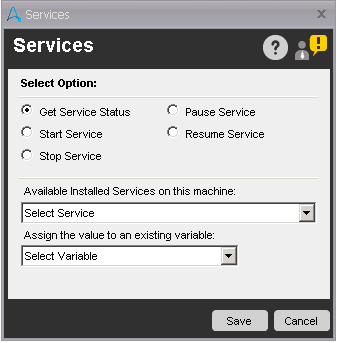
  • Get Service Status - This command is used to get the current status of the service, which is select from drop-down list.
    service comamnd in automation anywhere, SNMP command in automation anywhere, SNMP, Service,automation anywhere, automation anywhere analytics, automation anywhere architecture, automation anywhere artificial intelligence, automation anywhere banking, automation anywhere blue prism, automation anywhere bots, automation anywhere case study, automation anywhere ceo, automation anywhere certification, automation anywhere citrix, automation anywhere coding, automation anywhere cognitive, automation anywhere control room, automation anywhere controls, automation anywhere course, automation anywhere create exe, automation anywhere dashboard, automation anywhere data extraction, automation anywhere database, automation anywhere deloitte, automation anywhere demo, automation anywhere demo videos, automation anywhere deployment, automation anywhere development, automation anywhere download, automation anywhere email, automation anywhere enterprise, automation anywhere enterprise manual, automation anywhere error handling, automation anywhere example, automation anywhere excel, automation anywhere exception handling, automation anywhere exe, automation anywhere extract data, automation anywhere extract table, automation anywhere for beginners, automation anywhere founder, automation anywhere framework, automation anywhere getting started, automation anywhere global variables, automation anywhere help, automation anywhere image recognition, automation anywhere installation, automation anywhere integration, automation anywhere interface, automation anywhere interview questions, automation anywhere introduction, automation anywhere ipo, automation anywhere iq bot, automation anywhere keystrokes, automation anywhere learn, automation anywhere list variable, automation anywhere mainframe, Automation anywhere certification,How to register for Automation anywhere certification?
    Get Service Status
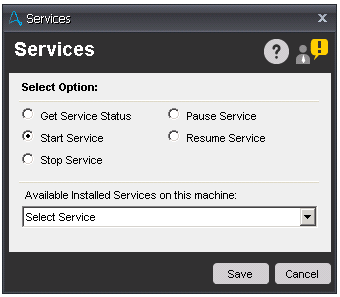
  • Start Service - This command is used to start the windows or application service. To start the service, select the service which you want to start from the drop-down list.
    service comamnd in automation anywhere, SNMP command in automation anywhere, SNMP, Service,automation anywhere, automation anywhere analytics, automation anywhere architecture, automation anywhere artificial intelligence, automation anywhere banking, automation anywhere blue prism, automation anywhere bots, automation anywhere case study, automation anywhere ceo, automation anywhere certification, automation anywhere citrix, automation anywhere coding, automation anywhere cognitive, automation anywhere control room, automation anywhere controls, automation anywhere course, automation anywhere create exe, automation anywhere dashboard, automation anywhere data extraction, automation anywhere database, automation anywhere deloitte, automation anywhere demo, automation anywhere demo videos, automation anywhere deployment, automation anywhere development, automation anywhere download, automation anywhere email, automation anywhere enterprise, automation anywhere enterprise manual, automation anywhere error handling, automation anywhere example, automation anywhere excel, automation anywhere exception handling, automation anywhere exe, automation anywhere extract data, automation anywhere extract table, automation anywhere for beginners, automation anywhere founder, automation anywhere framework, automation anywhere getting started, automation anywhere global variables, automation anywhere help, automation anywhere image recognition, automation anywhere installation, automation anywhere integration, automation anywhere interface, automation anywhere interview questions, automation anywhere introduction, automation anywhere ipo, automation anywhere iq bot, automation anywhere keystrokes, automation anywhere learn, automation anywhere list variable, automation anywhere mainframe, Automation anywhere certification,How to register for Automation anywhere certification?
    Start Service
  • Stop Service - This command is used to stop the windows or application service. To stop the service, select the service which you want to stop from the drop-down list.
  • Pause Service - This command is used to pause the windows or application service. To pause the service, select the service which you want to pause from the drop-down list.
  • Resume Service - This command is used to resume the windows or application service. To resume the service, select the service which you want to resume from the drop-down list.

SNMP Command

This command is use to manage and monitor network components such as workstations, printers, routers, bridges, and hubs, as well as services such as Dynamic Host Configuration Protocol (DHCP) or Windows Internet Name Service (WINS). SNMP stands for Simple Network Management Protocol.

Sub-Commands

  • Get - This command is use to get data from SNMP agent.
  • Get Next - This command is used to extended request command to browse the entire hierarchy of management objects.
  • Set - This command is use to modify data on SNMP agent.
  • Walk - This command is use to retrieve a sub-tree of management values using SNMP GET-NEXT requests.
  • Send Trap - This command is use to send trap messages to the SNMP Manager from an SNMP Agent. These messages are sent by an SNMP Agent whenever certain events occur, such as Link up.

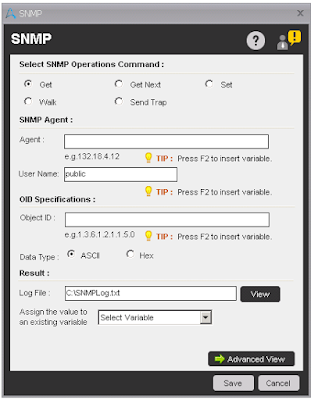
Components of Get/Get Next Sub-command:

  • Agent - Enter the SNMP IP Address or host name.
  • Community - This string is used for read-only access to a network element. By default, value of community is 'public'.
  • Object ID - Enter the the IP Address or host name.
  • Data Type - Select ASCII or Hex as per your requirement.
  • Log File - Select the file where you want to write a log for SNMP data.
  • Assign Value - Select the variable to assign the output of 'Get' command.
    service comamnd in automation anywhere, SNMP command in automation anywhere, SNMP, Service,automation anywhere, automation anywhere analytics, automation anywhere architecture, automation anywhere artificial intelligence, automation anywhere banking, automation anywhere blue prism, automation anywhere bots, automation anywhere case study, automation anywhere ceo, automation anywhere certification, automation anywhere citrix, automation anywhere coding, automation anywhere cognitive, automation anywhere control room, automation anywhere controls, automation anywhere course, automation anywhere create exe, automation anywhere dashboard, automation anywhere data extraction, automation anywhere database, automation anywhere deloitte, automation anywhere demo, automation anywhere demo videos, automation anywhere deployment, automation anywhere development, automation anywhere download, automation anywhere email, automation anywhere enterprise, automation anywhere enterprise manual, automation anywhere error handling, automation anywhere example, automation anywhere excel, automation anywhere exception handling, automation anywhere exe, automation anywhere extract data, automation anywhere extract table, automation anywhere for beginners, automation anywhere founder, automation anywhere framework, automation anywhere getting started, automation anywhere global variables, automation anywhere help, automation anywhere image recognition, automation anywhere installation, automation anywhere integration, automation anywhere interface, automation anywhere interview questions, automation anywhere introduction, automation anywhere ipo, automation anywhere iq bot, automation anywhere keystrokes, automation anywhere learn, automation anywhere list variable, automation anywhere mainframe, Automation anywhere certification,How to register for Automation anywhere certification?
    Get/Get Next

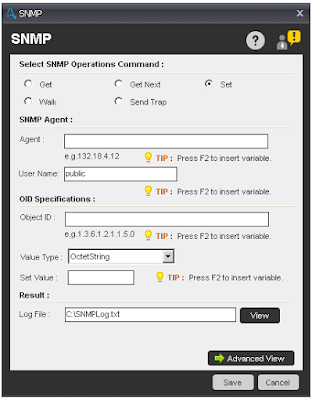
Components of Set Sub-command:

  • Agent - Enter the SNMP IP Address or host name.
  • Community - This string is used for read-only access to a network element. By default, value of community is 'public'.
  • Object ID - Enter the the IP Address or host name.
  • Value Type - Select the type of a value from the drop-down list. Available options are OctetString, Integer, Guage, TimeTicks, IP, ObjectID, OctetByteString, OctetDecimalByteString.
  • Set Value - Specify the value you want to set.
  • Log File - Select the file where you want to write a log for SNMP data.
    service comamnd in automation anywhere, SNMP command in automation anywhere, SNMP, Service,automation anywhere, automation anywhere analytics, automation anywhere architecture, automation anywhere artificial intelligence, automation anywhere banking, automation anywhere blue prism, automation anywhere bots, automation anywhere case study, automation anywhere ceo, automation anywhere certification, automation anywhere citrix, automation anywhere coding, automation anywhere cognitive, automation anywhere control room, automation anywhere controls, automation anywhere course, automation anywhere create exe, automation anywhere dashboard, automation anywhere data extraction, automation anywhere database, automation anywhere deloitte, automation anywhere demo, automation anywhere demo videos, automation anywhere deployment, automation anywhere development, automation anywhere download, automation anywhere email, automation anywhere enterprise, automation anywhere enterprise manual, automation anywhere error handling, automation anywhere example, automation anywhere excel, automation anywhere exception handling, automation anywhere exe, automation anywhere extract data, automation anywhere extract table, automation anywhere for beginners, automation anywhere founder, automation anywhere framework, automation anywhere getting started, automation anywhere global variables, automation anywhere help, automation anywhere image recognition, automation anywhere installation, automation anywhere integration, automation anywhere interface, automation anywhere interview questions, automation anywhere introduction, automation anywhere ipo, automation anywhere iq bot, automation anywhere keystrokes, automation anywhere learn, automation anywhere list variable, automation anywhere mainframe, Automation anywhere certification,How to register for Automation anywhere certification?
    Set

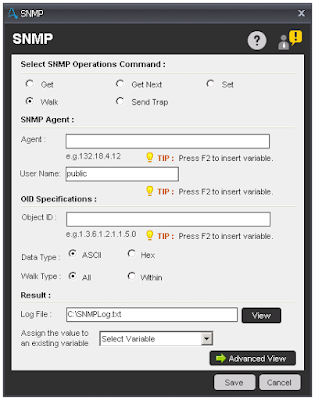
Components of Walk Sub-command:

  • Agent - Enter the SNMP IP Address or host name.
  • Community - This string is used for read-only access to a network element. By default, value of community is 'public'.
  • Object ID - Enter the IP Address or host name.
  • Data Type - Select ASCII or Hex as per your requirement.
  • Walk Type - Select option All or Within as per your requirement. For type within, all variables in the sub-tree below the given OID are queried. Using All displays the variables that are equal to the specified OID for the given tree type structure.
  • Log File - Select the file where you want to write a log for SNMP data.
  • Assign Value - Select the variable to assign the output of 'Get' command.
    service comamnd in automation anywhere, SNMP command in automation anywhere, SNMP, Service,automation anywhere, automation anywhere analytics, automation anywhere architecture, automation anywhere artificial intelligence, automation anywhere banking, automation anywhere blue prism, automation anywhere bots, automation anywhere case study, automation anywhere ceo, automation anywhere certification, automation anywhere citrix, automation anywhere coding, automation anywhere cognitive, automation anywhere control room, automation anywhere controls, automation anywhere course, automation anywhere create exe, automation anywhere dashboard, automation anywhere data extraction, automation anywhere database, automation anywhere deloitte, automation anywhere demo, automation anywhere demo videos, automation anywhere deployment, automation anywhere development, automation anywhere download, automation anywhere email, automation anywhere enterprise, automation anywhere enterprise manual, automation anywhere error handling, automation anywhere example, automation anywhere excel, automation anywhere exception handling, automation anywhere exe, automation anywhere extract data, automation anywhere extract table, automation anywhere for beginners, automation anywhere founder, automation anywhere framework, automation anywhere getting started, automation anywhere global variables, automation anywhere help, automation anywhere image recognition, automation anywhere installation, automation anywhere integration, automation anywhere interface, automation anywhere interview questions, automation anywhere introduction, automation anywhere ipo, automation anywhere iq bot, automation anywhere keystrokes, automation anywhere learn, automation anywhere list variable, automation anywhere mainframe, Automation anywhere certification,How to register for Automation anywhere certification?
    Walk

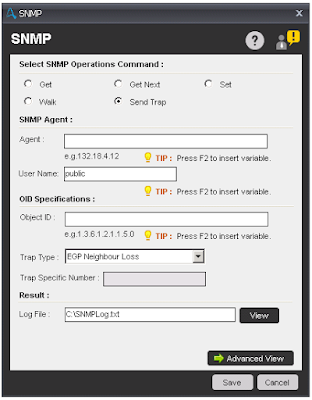
Components of Send Trap Sub-command:

  • Agent - Enter the SNMP IP Address or host name.
  • Community - This string is used for read-only access to a network element. By default, value of community is 'public'.
  • Object ID - Enter the IP Address or host name.
  • Trap Type -
    • Cold Start - Occurs when the SNMP agent initializes its configuration tables.
    • Warm Start - Occurs when the SNMP agent re-initializes its configuration tables.
    • Link Down - Occurs when the state of a network adapter on the SNMP agent changes from up to down.
    • Link Up - Occurs when the state of a network adapter on SNMP agent changes from down to up.
    • Authentication Fail - Occurs when the SNMP agent receives a message from an SNMP manager with an invalid community name.
    • EGP Neighbor Loss - when the SNMP agent cannot communicate with its Exterior Gateway Protocol (EGP) peer.
    • Enterprise Specific - Occurs when specific error conditions and error codes are defined in the system.
  • Trap Specific Number - Enter the Error code specified by the system. By default, this option is disabled. This option is enabled once you select 'Enterprise Specific' from the Trap Type drop-down list.
  • Log File - Select the file where you want to write a log for SNMP data.
    service comamnd in automation anywhere, SNMP command in automation anywhere, SNMP, Service,automation anywhere, automation anywhere analytics, automation anywhere architecture, automation anywhere artificial intelligence, automation anywhere banking, automation anywhere blue prism, automation anywhere bots, automation anywhere case study, automation anywhere ceo, automation anywhere certification, automation anywhere citrix, automation anywhere coding, automation anywhere cognitive, automation anywhere control room, automation anywhere controls, automation anywhere course, automation anywhere create exe, automation anywhere dashboard, automation anywhere data extraction, automation anywhere database, automation anywhere deloitte, automation anywhere demo, automation anywhere demo videos, automation anywhere deployment, automation anywhere development, automation anywhere download, automation anywhere email, automation anywhere enterprise, automation anywhere enterprise manual, automation anywhere error handling, automation anywhere example, automation anywhere excel, automation anywhere exception handling, automation anywhere exe, automation anywhere extract data, automation anywhere extract table, automation anywhere for beginners, automation anywhere founder, automation anywhere framework, automation anywhere getting started, automation anywhere global variables, automation anywhere help, automation anywhere image recognition, automation anywhere installation, automation anywhere integration, automation anywhere interface, automation anywhere interview questions, automation anywhere introduction, automation anywhere ipo, automation anywhere iq bot, automation anywhere keystrokes, automation anywhere learn, automation anywhere list variable, automation anywhere mainframe, Automation anywhere certification,How to register for Automation anywhere certification?
    Send Trap

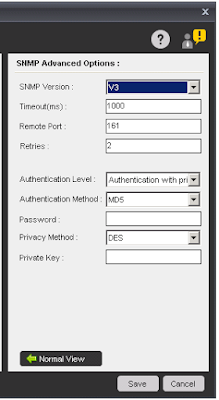
Note - If you select Advanced view, then additional SNMP options are provided.

  • SNMP Version: Select any of device versions - V1, V2 or V3
  • Timeout(ms): Specify the response time in milliseconds for the action to wait for before generating an error.
  • Remote Port: Specify the TCP/IP port to be used for the Get request. The default is 161.
  • Retries: Specify the number of times to retry the message.
SNMP device version V3 provide authentication levels to ensure a more secure environment.
service comamnd in automation anywhere, SNMP command in automation anywhere, SNMP, Service,automation anywhere, automation anywhere analytics, automation anywhere architecture, automation anywhere artificial intelligence, automation anywhere banking, automation anywhere blue prism, automation anywhere bots, automation anywhere case study, automation anywhere ceo, automation anywhere certification, automation anywhere citrix, automation anywhere coding, automation anywhere cognitive, automation anywhere control room, automation anywhere controls, automation anywhere course, automation anywhere create exe, automation anywhere dashboard, automation anywhere data extraction, automation anywhere database, automation anywhere deloitte, automation anywhere demo, automation anywhere demo videos, automation anywhere deployment, automation anywhere development, automation anywhere download, automation anywhere email, automation anywhere enterprise, automation anywhere enterprise manual, automation anywhere error handling, automation anywhere example, automation anywhere excel, automation anywhere exception handling, automation anywhere exe, automation anywhere extract data, automation anywhere extract table, automation anywhere for beginners, automation anywhere founder, automation anywhere framework, automation anywhere getting started, automation anywhere global variables, automation anywhere help, automation anywhere image recognition, automation anywhere installation, automation anywhere integration, automation anywhere interface, automation anywhere interview questions, automation anywhere introduction, automation anywhere ipo, automation anywhere iq bot, automation anywhere keystrokes, automation anywhere learn, automation anywhere list variable, automation anywhere mainframe, Automation anywhere certification,How to register for Automation anywhere certification?
Advance View

Share:

Popular Posts

Blog Archive

Total Pageviews

Recent Posts